"Never trust, always verify." That's the zero trust philosophy in five words. But what does it actually mean for your organization, and how do you move from a catchy slogan to a working security architecture? That's what we're going to break down — without the vendor marketing fluff.
Zero trust has been the hottest concept in cybersecurity for several years now, and for good reason. Traditional network security operates like a medieval castle: build a strong perimeter (firewall), and everything inside the walls is trusted. The problem? Once an attacker breaches the perimeter — through phishing, stolen credentials, or a compromised device — they have free rein inside the network. And with cyberattacks costing millions on average, that's a risk most organizations can't afford.
What Zero Trust Actually Means
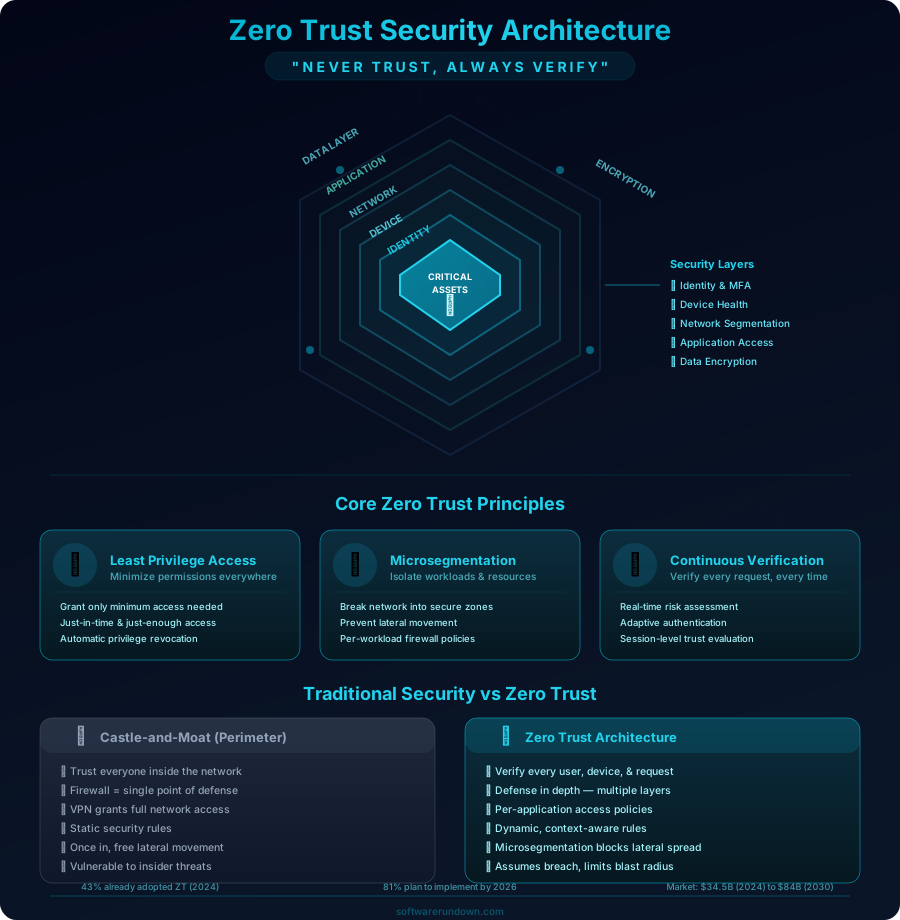
Zero trust is not a product you can buy. It's not a single technology. It's a security philosophy and architectural approach based on one core principle: no entity — user, device, application, or network flow — is automatically trusted, regardless of its location.
In a zero trust architecture:
- Every access request is authenticated, authorized, and encrypted
- Access is granted based on the principle of least privilege
- Continuous verification replaces one-time authentication
- Network location (inside/outside the firewall) doesn't determine trust
- Microsegmentation limits lateral movement if a breach occurs
Think of it this way: in a traditional model, showing your badge at the building entrance gives you access to every room. In zero trust, every door requires its own verification, and your access can be revoked mid-visit if something seems off.
The Five Pillars of Zero Trust
The NIST Zero Trust Architecture (SP 800-207) and CISA's Zero Trust Maturity Model identify five pillars. Here's what each one means in practice:
1. Identity
Identity is the foundation of zero trust. Every access decision starts with verifying who (or what) is making the request.
What this looks like:
- Multi-factor authentication (MFA) for all users — no exceptions for executives or IT admins
- Passwordless authentication where possible (FIDO2, WebAuthn, passkeys)
- Single Sign-On (SSO) via a centralized identity provider (Okta, Azure AD, Google Workspace)
- Conditional access policies (require MFA from new devices, block access from high-risk countries)
- Service identities and machine-to-machine authentication (service accounts, API keys with short lifespans)
Common mistake: Implementing MFA but excluding service accounts. Attackers increasingly target machine identities because they're often over-privileged and under-monitored.
2. Devices
A verified user on a compromised device is still a threat. Zero trust evaluates device health before granting access.
What this looks like:
- Endpoint Detection and Response (EDR) required on all managed devices
- Device posture checks before access (OS version, encryption status, antivirus status)
- Mobile Device Management (MDM) for company and BYOD devices
- Certificate-based device identity (not just user credentials)
- Automatic quarantine for devices that fall out of compliance
Common mistake: Allowing access from personal devices without any posture assessment. If you support BYOD, implement at minimum a device trust agent that checks basic security hygiene.
3. Network
The network in zero trust is untrusted by default. Microsegmentation ensures that even authenticated users can only reach the specific resources they need.
What this looks like:
- Microsegmentation — workloads are isolated from each other
- Encrypted communications (mTLS) between all services, even internal ones
- Software-defined perimeter (SDP) instead of traditional VPN for remote access
- DNS filtering and network monitoring for anomaly detection
- East-west traffic inspection (not just north-south)
Common mistake: Microsegmenting the network but leaving legacy applications with broad network access because "they break otherwise." Those legacy systems are exactly what attackers target.
4. Applications and Workloads
Applications should authenticate and authorize every request, not rely on network-level controls.
What this looks like:
- Application-level authentication (OAuth 2.0, OpenID Connect)
- API gateways with rate limiting, authentication, and threat detection
- Container security and runtime protection for cloud-native applications
- CI/CD pipeline security (code scanning, dependency auditing, signed artifacts)
- Regular vulnerability scanning and patching
Common mistake: Securing the perimeter of an application but not securing internal APIs. If microservice A can call microservice B without authentication, an attacker who compromises A gets B for free.
5. Data
Data is what attackers ultimately want. Zero trust protects data regardless of where it lives.
What this looks like:
- Data classification (public, internal, confidential, restricted)
- Encryption at rest and in transit for all sensitive data
- Data Loss Prevention (DLP) policies that prevent exfiltration
- Access logging for all data repositories
- Rights management (who can read, write, share, download)
Common mistake: Encrypting data in transit but storing it unencrypted in databases and backups. If your backup tapes or cloud snapshots aren't encrypted, they're a treasure chest for attackers.
How to Implement Zero Trust: A Practical Roadmap
Here's the uncomfortable truth: you can't implement zero trust overnight. It's a multi-year journey for most organizations. But you can start getting value from day one with the right prioritization.
Phase 1: Foundation (Months 1-3)
Goal: Establish identity as the security perimeter.
- Deploy a modern identity provider — If you're still using on-premises Active Directory without cloud SSO, this is step zero. Azure AD, Okta, or Google Workspace Identity.
- Enable MFA everywhere — All users, all applications, no exceptions. Start with phishing-resistant MFA (FIDO2 keys or passkeys) for admins and privileged users.
- Inventory your assets — You can't protect what you don't know about. Catalog all users, devices, applications, and data repositories.
- Implement conditional access — Block access from unmanaged devices to sensitive applications. Require MFA step-up for risky sign-ins.
Phase 2: Device Trust and Endpoint Security (Months 3-6)
Goal: Ensure devices meet security baselines before accessing resources.
- Deploy EDR on all endpoints — CrowdStrike, SentinelOne, Microsoft Defender for Endpoint. Non-negotiable.
- Implement device compliance policies — Require encryption, current OS patches, active EDR. Non-compliant devices get limited access.
- Enable device certificates for managed devices — This prevents credential theft from being sufficient for access.
- Set up MDM for mobile devices — Apple Business Manager, Intune, Jamf.
Phase 3: Network Segmentation (Months 6-12)
Goal: Limit blast radius of any potential breach.
- Segment your network — At minimum, separate user traffic, server traffic, and IoT/OT traffic.
- Replace VPN with ZTNA — Tools like Zscaler Private Access, Cloudflare Access, or Tailscale replace traditional VPN with application-specific access. For current VPN options, see our business VPN guide.
- Implement mTLS between services — Service mesh (Istio, Linkerd) for containerized environments, or certificate-based authentication for traditional services.
- Enable DNS filtering — Block known malicious domains. Cloudflare Gateway, Cisco Umbrella, or NextDNS.
Phase 4: Application and Data Security (Months 12-18)
Goal: Protect applications and data with granular controls.
- Implement application-level access controls — Every application authenticates users via your IdP. No shared accounts, no embedded credentials.
- Classify your data — Start with two categories: sensitive and everything else. Expand later.
- Deploy DLP — Prevent sensitive data from leaving approved channels. Start with email and cloud storage.
- Secure your CI/CD pipeline — Code scanning, dependency checking, signed deployments. Supply chain attacks are a growing threat.
Phase 5: Continuous Improvement (Ongoing)
Goal: Monitor, learn, and adapt.
- Centralize logging — All access decisions, authentication events, and data access in a SIEM (Splunk, Elastic, Microsoft Sentinel).
- Implement behavioral analytics — UEBA (User and Entity Behavior Analytics) detects anomalies that rule-based systems miss.
- Regular penetration testing — Test your zero trust controls. Can a compromised endpoint access resources it shouldn't? Can a stolen token be replayed?
- Tabletop exercises — Simulate breach scenarios and walk through your response.
Zero Trust Tools and Platforms
Several platforms offer integrated zero trust capabilities:
| Platform | Strengths | Best For |
|---|---|---|
| Zscaler | ZTNA, SWG, CASB, DLP in one platform | Large enterprises |
| Cloudflare Zero Trust | Access, Gateway, Browser Isolation, free tier | SMBs and mid-market |
| Microsoft Entra + Defender | Deep M365 integration, Conditional Access | Microsoft-centric organizations |
| Palo Alto Prisma Access | SASE with strong network security heritage | Network-heavy enterprises |
| CrowdStrike Falcon | EDR + identity protection + zero trust assessment | Security-mature organizations |
For smaller organizations, Cloudflare Zero Trust offers a remarkably capable free tier that includes Access (ZTNA for up to 50 users), Gateway (DNS filtering), and WARP (device agent). It's arguably the fastest path to basic zero trust for an SMB.
Common Zero Trust Mistakes
- Treating it as a product purchase. Buying a "zero trust solution" without changing processes is security theater. Zero trust is an architectural shift, not a product.
- Boiling the ocean. Trying to implement everything at once leads to paralysis. Start with identity and expand systematically.
- Ignoring user experience. If zero trust makes employees' jobs significantly harder, they'll find workarounds that are worse than the original security gap. Balance security with usability.
- Forgetting non-human identities. Service accounts, API keys, and machine identities often outnumber human users 10:1. They need the same zero trust treatment.
- Not measuring progress. Define metrics: percentage of applications behind ZTNA, MFA adoption rate, mean time to revoke access, etc. What you don't measure, you don't improve.
Is Zero Trust Worth It?
According to IBM's Cost of a Data Breach report, organizations with mature zero trust implementations experience breach costs that are $1.76 million lower than those without. The average breach costs $4.88 million. That math speaks for itself.
But beyond the numbers, zero trust fundamentally changes your security posture from reactive to proactive. Instead of assuming you're safe until proven otherwise, you assume compromise and build accordingly. In a world where ransomware attacks are a matter of when rather than if, that's the only rational approach.
Start with MFA. Today. Everything else follows from there. Your future CISO will thank you for building the foundation now.