What Is Ransomware?
Ransomware is a type of malicious software that encrypts a victim's files or locks access to their systems, then demands a ransom payment — typically in cryptocurrency — in exchange for the decryption key needed to restore access. Attacks can target individuals, corporations, hospitals, and governments alike, making ransomware one of the most financially devastating categories of cybercrime today.
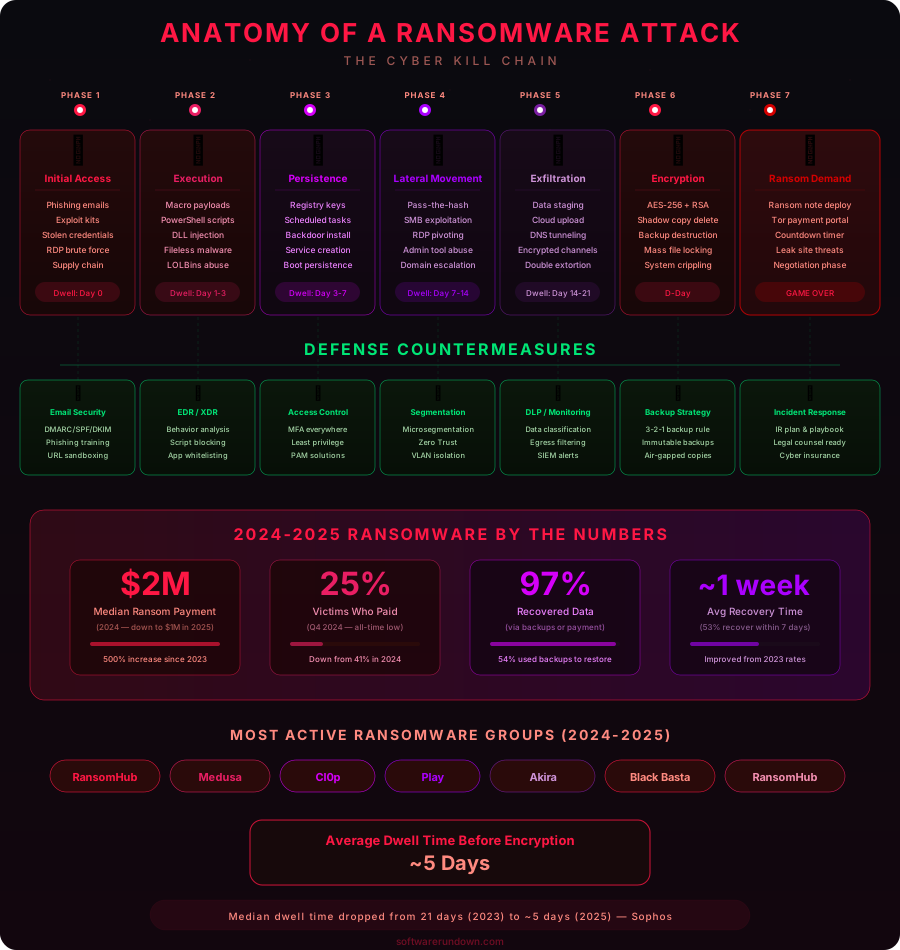
The concept sounds almost simple when laid out like that, but the reality is considerably more brutal. When ransomware hits, it doesn't just lock a few documents — it can paralyze an entire organization within minutes. According to Cybersecurity Ventures, global ransomware damages exceeded $30 billion in 2023, a figure that keeps climbing year over year. Understanding how these attacks work is the first step toward not becoming another statistic.
How Ransomware Works: The Technical Mechanics
The Encryption Engine
Modern ransomware relies on asymmetric encryption — the same mathematical principles that secure your online banking. When ransomware executes on a target system, it contacts the attacker's command-and-control server to retrieve a public encryption key. It then uses that key to encrypt files across the system, making them unreadable without the corresponding private key, which only the attacker holds.
The encryption itself is typically fast and thorough. Variants like LockBit 3.0 are engineered to encrypt data at extraordinary speeds, sometimes processing gigabytes per minute to outrun detection tools. The malware prioritizes high-value file types — documents, spreadsheets, databases, images, backups — while deliberately leaving operating system files intact so the victim can still read the ransom note and make payment.
Double Extortion: When Encryption Isn't Enough
Starting around 2019, ransomware groups introduced a tactic that fundamentally changed the threat landscape: double extortion. Under this model, attackers don't just encrypt your files — they exfiltrate them first. They then threaten to publish stolen data on a "leak site" on the dark web unless the ransom is paid, even if the victim has clean backups that allow them to restore operations without paying.
The Cl0p gang perfected this approach during the MOVEit Transfer attacks in 2023, compromising hundreds of organizations by exploiting a zero-day vulnerability and stealing data before deploying any encryption at all. Some victims never saw their files locked — they were simply extorted based on what had been taken. Triple extortion adds yet another layer: contacting the victim's customers or partners directly to apply additional pressure.
How Ransomware Gets In: Infection Vectors
Phishing Emails
Phishing remains the most common entry point by a significant margin. A convincing email arrives — it might impersonate a shipping notification, an HR document, or an invoice — and attached to it is a malicious file. One click executes a macro or a dropper that installs the ransomware payload. Business email compromise has made these lures increasingly credible; attackers now use AI to craft phishing messages in flawless prose tailored to specific targets, a technique sometimes called spear phishing.
Exposed RDP and Remote Access
Remote Desktop Protocol (RDP) has been a goldmine for ransomware operators since the shift to remote work accelerated its deployment. Attackers scan the internet for systems with RDP exposed on port 3389, then attempt credential stuffing using lists of stolen usernames and passwords. When they find a match, they walk straight through the front door. RDP-based intrusions were the initial access vector in roughly half of all ransomware cases analyzed by Coveware in 2022.
Software Vulnerabilities
Unpatched software is an open invitation. The WannaCry attack of 2017 exploited EternalBlue, a vulnerability in Windows SMB that Microsoft had patched two months earlier — yet hundreds of thousands of systems remained unpatched when the worm spread across 150 countries in a single day. The same story repeated itself with the Kaseya VSA attack in 2021, where a zero-day in IT management software gave attackers a supply-chain lever to push ransomware to thousands of managed service provider clients simultaneously.
Malvertising and Drive-By Downloads
Ransomware can also arrive through compromised advertising networks. A legitimate website displays a malicious ad that redirects visitors to an exploit kit, which silently probes the browser for vulnerabilities and executes code without any user interaction beyond the initial page load. These drive-by attacks are particularly insidious because the victim doesn't have to click anything suspicious — simply visiting the wrong page at the wrong time is enough.
Notable Ransomware Attacks
WannaCry (2017)
WannaCry is arguably the attack that made ransomware a household word. Leveraging the EternalBlue exploit — believed to have been developed by the NSA and later leaked by the Shadow Brokers hacking group — WannaCry spread autonomously as a worm, requiring no human interaction to propagate across networks. The UK's National Health Service was among the worst-hit organizations, with hospitals forced to turn away patients and cancel appointments. Total damages were estimated at $4–8 billion. Attribution pointed to North Korea's Lazarus Group.
Colonial Pipeline (2021)
The Colonial Pipeline attack by the DarkSide group demonstrated how ransomware could trigger real-world physical consequences. Colonial, which supplies roughly 45% of the fuel consumed on the US East Coast, shut down its pipeline proactively after the attack to prevent the ransomware from spreading from IT systems to operational technology. The resulting fuel shortage caused panic buying across the southeastern United States. Colonial paid approximately $4.4 million in ransom, though the FBI subsequently recovered a portion of the cryptocurrency. The incident prompted the Biden administration to issue an executive order on cybersecurity.
MOVEit (2023)
The MOVEit Transfer campaign orchestrated by the Cl0p ransomware group stands as one of the largest data theft events in history. By exploiting a previously unknown SQL injection vulnerability in Progress Software's MOVEit Transfer product, Cl0p accessed the systems of hundreds of organizations — including Shell, the BBC, British Airways, and multiple US federal agencies. Estimates suggest more than 2,600 organizations and 77 million individuals were affected. Notably, Cl0p focused exclusively on data theft rather than encryption, underscoring how the extortion model has evolved beyond its origins.
What to Do During a Ransomware Attack
Isolate Immediately
The first priority is containment. Disconnect affected machines from the network — unplug ethernet cables, disable Wi-Fi — to prevent lateral movement. If the infection is active, the ransomware may still be encrypting files and scanning for additional targets on the local network. Speed matters enormously here; every minute of connectivity is an opportunity for the malware to spread further or exfiltrate more data.
Do Not Pay Without Careful Consideration
The decision to pay a ransom is rarely straightforward. Paying does not guarantee you will receive a working decryption key — a significant percentage of victims who pay never fully recover their data. It also funds criminal organizations and may make you a target for repeat attacks. That said, for organizations without backups facing irreversible data loss or life-threatening operational disruption, payment may be the least bad option. Before paying, consult with a ransomware response firm and check whether a free decryptor exists at No More Ransom (nomoreransom.org), a repository maintained by law enforcement and cybersecurity companies.
Preserve Evidence and Report
Do not immediately wipe affected systems. Forensic investigators will need logs, memory dumps, and artifacts to understand how the attackers entered, what was accessed, and whether data was exfiltrated. Report the incident to your national cybercrime authority — in the US, that's the FBI's Internet Crime Complaint Center (IC3); in the EU, Europol's cybercrime unit. Reporting helps law enforcement track ransomware groups and occasionally results in recovered funds.
Restore from Clean Backups
If you have verified, offline backups, this is your recovery path. Before restoring, ensure the attack vector has been identified and closed — restoring to a still-compromised environment is a fast track to getting hit again. Confirm your backups are clean and untouched by the ransomware (some variants specifically target backup systems) before beginning restoration.
How to Protect Yourself Against Ransomware
The 3-2-1 Backup Rule
The single most effective defense against ransomware — the one that transforms a catastrophic event into a manageable inconvenience — is a solid backup strategy. The 3-2-1 rule: keep three copies of your data, on two different media types, with one copy stored offline or air-gapped. Offline backups cannot be encrypted by ransomware because they are physically disconnected from the network. Test your restores regularly; a backup you have never tested is a backup you cannot trust.
Patch Early, Patch Often
WannaCry, MOVEit, Kaseya — the through-line in major ransomware incidents is exploited vulnerabilities that had patches available. Establish a vulnerability management program that prioritizes internet-facing systems and applies critical patches within 24–48 hours of release. For systems that cannot be patched quickly, consider compensating controls such as network segmentation or web application firewalls.
Harden Remote Access
If RDP is necessary, never expose it directly to the internet. Place it behind a VPN with multi-factor authentication. Enforce strong, unique passwords and consider restricting RDP access by IP allowlist. Monitor for brute-force attempts and implement account lockout policies. For most organizations, the security cost of exposed RDP far outweighs its convenience.
Deploy Endpoint Detection and Response
Traditional antivirus is insufficient against modern ransomware, which uses techniques like living-off-the-land (abusing legitimate Windows tools), fileless execution, and obfuscation to evade signature-based detection. Endpoint Detection and Response (EDR) solutions monitor behavioral patterns — unusual file encryption activity, anomalous process trees, suspicious network calls — and can terminate ransomware before it encrypts significant data. For business deployments, our guide to the best antivirus solutions for businesses in 2026 covers the leading EDR-capable platforms in detail.
Train Your People
Security awareness training is unglamorous but genuinely effective. Employees who can recognize phishing attempts, who know not to enable macros in unsolicited documents, and who understand the reporting procedure for suspicious emails are a meaningful line of defense. Simulated phishing exercises — where the security team sends fake phishing emails to measure click rates and retrain those who fall for them — are a proven method for building muscle memory.
Implement Least-Privilege Access
Ransomware can only encrypt what it can reach. If every user account has local administrator rights and broad file share access, a single compromised credential can unlock the entire environment. Least-privilege access means users have only the permissions they need for their role — nothing more. Combined with network segmentation that limits lateral movement between departments or systems, it dramatically reduces the blast radius of a successful intrusion.
The Bigger Picture
Ransomware is not a new phenomenon — the first documented case, the AIDS Trojan, was distributed via floppy disks in 1989 — but it has matured into a sophisticated, professionalized criminal industry. Today's ransomware groups operate with HR departments, customer support portals for victims, and affiliate programs that let other criminals deploy their malware for a cut of the proceeds. The barrier to entry has fallen while the rewards have risen.
The defensive posture required to resist these attacks is not exotic. Backups, patching, MFA, and endpoint protection cover the overwhelming majority of attack vectors. The challenge is execution: consistently applying fundamentals across an entire organization, every day. For a broader look at building a layered security strategy that addresses ransomware alongside phishing, data breaches, and zero-day exploits, the 2026 cybersecurity guide walks through the full framework.
Ransomware is, at its core, a problem of incentives: as long as victims pay, attackers will keep attacking. Reducing the likelihood that you will need to pay — through resilient backups, hardened access controls, and well-trained staff — is the most reliable way to stay off the wrong side of the equation.