SaaS, or Software as a Service, is a cloud-based delivery model where software is hosted by a vendor and accessed over the internet on a subscription basis. You log in through a browser; the provider manages infrastructure, updates, and security. No installation, no on-premise servers — just the application, ready to use from any device.
That single paragraph covers the core of it. But if you are making a buying decision, evaluating vendors, or just trying to understand where SaaS fits in the broader cloud landscape, the details matter a great deal. This guide covers everything: the technical architecture, real-world examples, the honest trade-offs, and where the market is heading. For a broader look at cloud infrastructure itself, see our Cloud Computing Guide 2026.
SaaS vs. IaaS vs. PaaS: Understanding the Cloud Stack
Cloud computing is usually broken into three service layers, and it helps to understand all three before focusing on SaaS specifically.
Infrastructure as a Service (IaaS)
IaaS gives you raw computing resources — virtual machines, storage, networking — delivered over the internet. You get maximum control: you choose the operating system, install your own software stack, and manage security patches yourself. AWS EC2, Google Compute Engine, and Azure Virtual Machines are the canonical examples. IaaS is powerful, but it demands significant technical expertise. You are essentially renting a data center rack, not a finished product.
Platform as a Service (PaaS)
PaaS sits one layer above IaaS. The cloud provider manages the underlying infrastructure and runtime environment; your team focuses on writing and deploying application code. Heroku, Google App Engine, and AWS Elastic Beanstalk fall into this category. PaaS is popular with development teams that want to ship features fast without worrying about server provisioning.
Software as a Service (SaaS)
SaaS is the top of the stack and the most consumer-facing layer. You are not managing infrastructure or deploying code — you are simply using a finished, hosted application. The vendor owns the entire stack: servers, networking, runtime, application code, and data storage. Your only responsibility is configuring the software to fit your workflow and, of course, paying the subscription.
A useful mental model: IaaS gives you a kitchen, PaaS gives you a kitchen with appliances already installed, and SaaS delivers the cooked meal.
Real-World SaaS Examples You Already Use
SaaS is not an abstract concept. There is a good chance you used at least three SaaS products before lunch today.
Slack
Slack is the dominant team communication platform — channels, direct messages, integrations with hundreds of other tools. Nothing to install on a server. You sign up, invite your team, and you are live in minutes. Slack stores message history in the cloud and syncs across every device you use. The free tier is genuinely functional; paid plans unlock longer message history and more advanced admin controls.
Salesforce
Salesforce essentially invented the modern SaaS playbook when it launched in 1999 with the provocative tagline "No Software." Today it is the world's largest CRM platform, used by companies ranging from two-person sales teams to Fortune 500 enterprises. The platform manages leads, pipelines, customer data, and forecasting — all in a browser, all updated in real time for every user on the account.
Google Workspace
Gmail, Google Docs, Google Drive, Google Meet — this entire suite is SaaS. Millions of businesses run their email and document collaboration on Google's infrastructure. Documents auto-save to the cloud, multiple users can edit simultaneously, and the IT department does not need to maintain an Exchange server. For small businesses in particular, the cost and operational simplicity compared to on-premise alternatives is transformative.
HubSpot
HubSpot built its reputation on inbound marketing software and has since expanded into a full CRM platform covering sales, service, and content management. Its free tier is one of the most generous in SaaS — enough for a growing startup to run serious marketing campaigns without touching a credit card. Paid tiers scale as teams grow, which is the classic SaaS land-and-expand model in action.
Zoom
Video conferencing went from a niche IT product to a household verb largely because of Zoom's SaaS execution. Hosts manage meetings from a web dashboard; participants can join directly from a browser link with no account required. The infrastructure that handles millions of simultaneous video streams is entirely invisible to the end user. That invisibility is exactly the point.
The Advantages of SaaS
The appeal of SaaS is not just convenience. There are structural financial and operational advantages that explain why enterprise software buyers have shifted dramatically toward subscription cloud products over the past decade.
Lower Upfront Cost
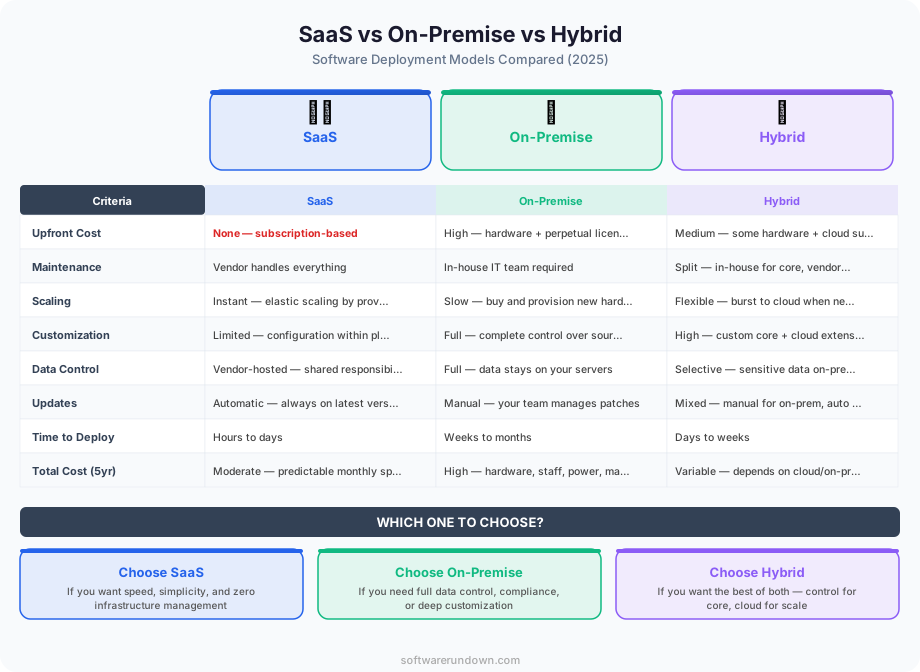
Traditional enterprise software came with significant upfront licensing fees — sometimes six or seven figures before a single user logged in. SaaS converts that capital expenditure into a predictable operating expenditure. Monthly or annual subscriptions are easier to budget, easier to justify to finance teams, and easier to cancel if the product underdelivers.
Automatic Updates
When Salesforce ships a new feature, every customer gets it. No patching cycle, no compatibility testing against your internal infrastructure, no weekend maintenance window. Vendors handle all of that. For security patches in particular, this matters enormously — vulnerabilities get closed at the vendor level without requiring any action from customers.
Accessibility and Remote Work
SaaS applications run in a browser, which means they run on any device with an internet connection. For distributed teams, this is not a nice-to-have — it is a fundamental operational requirement. The shift to remote work accelerated SaaS adoption precisely because browser-based tools work identically whether an employee is in a corporate office, a home office, or an airport lounge.
Scalability on Demand
Adding a seat to a SaaS product is a billing change. Adding a server to an on-premise deployment is a procurement project. For fast-growing companies, SaaS scales gracefully without infrastructure planning. Equally important, it scales down — reducing seats during a restructuring does not leave you stuck with licenses you paid for upfront.
Faster Time to Value
Implementation timelines for SaaS products are measured in days or weeks, not months or years. That speed compounds: faster onboarding means faster adoption, which means faster ROI data, which makes it easier to justify expanding usage.
The Disadvantages of SaaS
No deployment model is universally superior, and SaaS has real limitations that any serious evaluation should address honestly.
Vendor Lock-In
Your data lives in someone else's infrastructure. Migrating away from a deeply embedded SaaS platform — especially one that has accumulated years of customer records, integrations, and custom configurations — is expensive and disruptive. Before committing to any major SaaS platform, it is worth asking: what does data export look like, and how difficult would switching be in three years?
Limited Customization
SaaS products are built for broad market fit, not your specific workflow. The customization available through settings, APIs, and integrations is often substantial, but there are ceilings. Businesses with genuinely unique operational requirements sometimes find that SaaS forces process compromise — you adapt your workflow to the software rather than the reverse.
Internet Dependency
No internet connection means no access to your tools. For most businesses in most geographies, connectivity is reliable enough that this is a theoretical risk rather than a practical one. But for field operations in remote areas, or in regions with unstable infrastructure, this dependency can be a real constraint.
Data Security and Compliance
Regulated industries — healthcare, finance, legal — face genuine complexity when evaluating SaaS products. Where does the data reside? Which compliance certifications does the vendor hold? What happens to your data if the vendor is acquired or shuts down? These are answerable questions, but they require due diligence that a simple sign-up flow does not prompt you to do.
Cumulative Subscription Costs
SaaS subscriptions are individually modest and collectively significant. A mid-size company running 40 or 50 SaaS products — which is common — may spend more annually than equivalent on-premise licensing would have cost, once you account for the full stack. SaaS sprawl is a real problem, and periodic auditing of which subscriptions are actually being used has become a standard IT discipline.
SaaS Pricing Models
SaaS vendors have developed a range of pricing structures, and understanding them helps both buyers and builders make smarter decisions.
Per-User (Per-Seat) Pricing
The most common model. You pay a flat rate per user per month. Slack, Microsoft 365, and most CRM platforms use this structure. It aligns vendor revenue with customer growth, which is elegant in principle — but it can create perverse incentives, like teams sharing logins to stay within seat limits.
Usage-Based Pricing
Increasingly popular, particularly in infrastructure-adjacent SaaS products. You pay for what you consume — API calls, data processed, emails sent. Twilio and AWS are the most cited examples, though many pure SaaS products have added usage components alongside base subscriptions. Usage-based pricing lowers the barrier to entry but makes budgeting less predictable.
Tiered Pricing
Vendors offer multiple plans — typically Free, Pro, Business, Enterprise — with features gated behind higher tiers. HubSpot's model is a textbook example: the free CRM is genuinely useful, but marketing automation, custom reporting, and advanced permissions require paid plans. Tiered pricing funds a freemium acquisition strategy while protecting premium revenue.
Flat-Rate Pricing
A single monthly fee for unlimited users and features. Less common because it is harder to grow revenue without raising prices, but some vendors use it as a differentiation play against per-seat competitors.
B2B SaaS vs. B2C SaaS
The SaaS category spans two very different market segments that operate by different commercial logic.
B2B SaaS targets businesses as customers. Sales cycles are longer, deal sizes are larger, and the buying process typically involves multiple stakeholders, security reviews, and contract negotiations. Salesforce, Workday, and ServiceNow are pure B2B plays. Customer success teams are essential in B2B SaaS because annual contract renewals depend on demonstrating measurable value.
B2C SaaS targets individual consumers or small teams who can buy without committee approval. Spotify, Dropbox, and Canva operate this way. CAC (customer acquisition cost) is lower, churn is higher, and the product must be compelling enough to retain users without a dedicated success team. Pricing is typically lower, and volume is how the economics work.
Many successful SaaS companies straddle both — starting as consumer products and expanding into enterprise as usage within organizations scales. Slack, Notion, and Figma all followed this path.
For a direct comparison of the cloud platforms that underpin many SaaS products, see our breakdown of AWS vs Azure vs Google Cloud.
Future Trends in SaaS
The SaaS market continues to evolve rapidly, and several shifts are worth tracking if you are building on, investing in, or buying SaaS products.
AI-Native SaaS
The next generation of SaaS products is being built with AI capabilities at the core rather than bolted on as features. Tools like Cursor (AI-powered code editor), Glean (enterprise search), and a new wave of vertical AI applications are rethinking what software does when it can understand context and generate output rather than just store and display data. Incumbents are racing to embed AI across their platforms — Salesforce Einstein, HubSpot Breeze, and Microsoft Copilot are all attempts to defend existing positions against AI-native challengers.
Vertical SaaS
Horizontal SaaS platforms try to serve every industry. Vertical SaaS focuses deeply on one — construction, healthcare, restaurants, legal services. Veeva (pharma), Toast (restaurants), and Procore (construction) demonstrate that deep industry fit commands premium pricing and lower churn. The vertical SaaS wave has not crested yet; most industries still have significant software gaps.
Product-Led Growth
The traditional SaaS go-to-market model relied on inside sales teams calling prospects. Product-led growth (PLG) inverts this: the product acquires, activates, and expands users through its own experience. Free tiers, viral sharing mechanics, and in-product upgrade prompts replace the SDR cold call. Figma, Notion, and Calendly built billion-dollar businesses this way. PLG is now the default strategy for new SaaS entrants targeting sub-enterprise buyers.
Composability and the API Economy
Modern SaaS products are increasingly designed to connect rather than replace each other. Zapier, Make, and n8n exist entirely to wire SaaS tools together. Businesses build custom workflows by composing best-in-class point solutions rather than buying a single all-in-one platform. This composability trend benefits nimble specialists over bloated suites — though it also increases the SaaS sprawl problem described above.
Is SaaS Right for Your Business?
The honest answer is: probably for most things, yes. The operational and financial advantages of SaaS are real and well-documented. The failure modes — vendor lock-in, security gaps, cost sprawl — are manageable with deliberate procurement practices.
The evaluation framework is straightforward. For any software category you are considering: Does your use case require customization that SaaS cannot support? Do your compliance requirements restrict where data can reside? Is the total cost of multiple subscriptions actually lower than building or buying on-premise? If the answers are no, yes, and yes respectively, SaaS is almost certainly the right call.
The shift to cloud-delivered software was already inevitable before 2020. Remote work, accelerated digital transformation, and now AI integration have made SaaS the default — not the alternative — for most business software categories. The question is less often "should we use SaaS" and more often "which SaaS, and how do we manage the portfolio."