The note-taking app you choose says something about how your brain works. Are you a visual organizer who thinks in databases and Kanban boards? A writer who wants plain text files you'll own forever? Or a networked thinker who connects ideas in graphs and outlines? Notion, Obsidian, and Logseq each cater to a different philosophy — and picking the wrong one means fighting your tool instead of using it.
We've spent months using all three as our primary note-taking system (one at a time, we're not masochists). Here's what we learned.
The Fundamental Difference
Before comparing features, understand the core philosophy of each:
- Notion is an all-in-one workspace. Notes, databases, wikis, project management, calendars — it tries to replace multiple tools. Your data lives on Notion's servers.
- Obsidian is a knowledge base built on local Markdown files. Your notes are plain text files on your computer. Obsidian is just the viewer/editor — you could open the same files in any text editor.
- Logseq is an outliner-first knowledge graph. Like Obsidian, it uses local files (Markdown or Org-mode). But everything is structured as bullet-point outlines with bidirectional links.
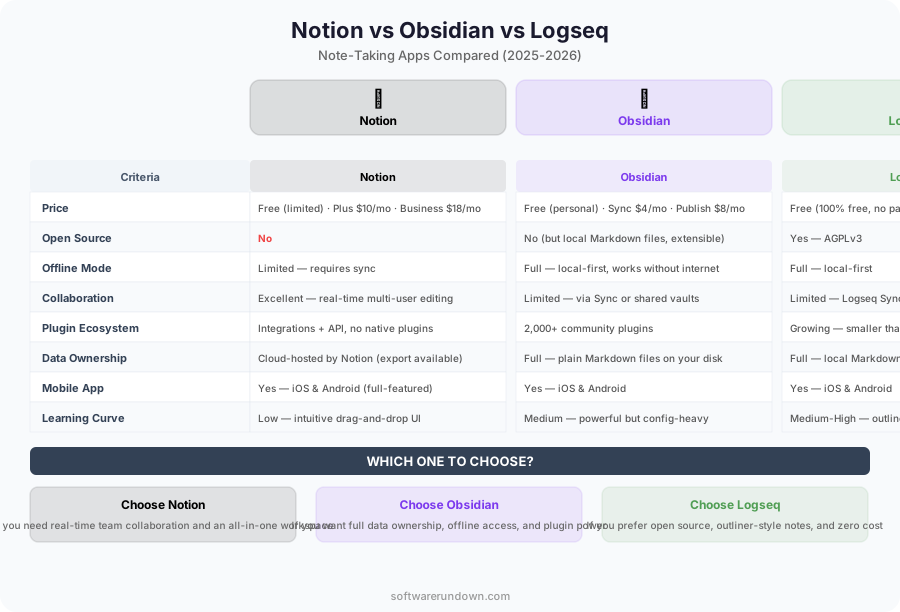
This philosophical difference drives every other comparison. If you care about data ownership and longevity, Obsidian and Logseq win before we even discuss features. If you care about collaboration and all-in-one convenience, Notion is the clear choice.
Feature Comparison
| Feature | Notion | Obsidian | Logseq |
|---|---|---|---|
| Data storage | Cloud (Notion servers) | Local files (Markdown) | Local files (Markdown/Org) |
| Offline access | Limited | Full | Full |
| Real-time collaboration | Excellent | No (sync only) | No (sync only) |
| Databases/tables | Powerful | Via Dataview plugin | Basic queries |
| Graph view | No | Yes | Yes |
| Bidirectional links | Basic | Core feature | Core feature |
| AI features | Notion AI ($10/mo extra) | Via plugins (Copilot, etc.) | Via plugins |
| API | REST API | Plugin API | Plugin API |
| Templates | Extensive gallery | Community templates | Limited |
| Mobile app | Good | Good | Functional |
| Free tier | Yes (limited blocks for teams) | Free (personal use) | Free (open source) |
| Paid plans | $10-15/user/month | $50/yr (sync) + $96/yr (publish) | Free forever |
Notion: The All-in-One Workspace
Strengths
Notion's superpower is versatility. A single Notion workspace can replace your note-taking app, your project management tool, your wiki, your CRM, and your team documentation. The database feature — with its views (table, board, calendar, gallery, timeline) — is genuinely powerful for organizing structured information.
For teams, Notion is hard to beat. Real-time collaboration works smoothly. Page permissions, shared workspaces, and guest access make it practical for organizations of any size. The template gallery provides starting points for almost anything — meeting notes, product roadmaps, OKRs, content calendars.
Notion AI has matured into a genuinely useful writing assistant. It can summarize pages, extract action items, generate content drafts, and answer questions about your workspace. For teams drowning in documentation, the Q&A feature alone can justify the $10/user/month AI add-on.
Weaknesses
Performance. Notion is slow. Opening a large page takes noticeable time. Search across a big workspace can take seconds. The mobile app improves every update but still feels sluggish compared to native apps. When you've been spoiled by Obsidian's instant everything, Notion's loading spinners become infuriating.
Data lock-in is real. Yes, you can export to Markdown, but Notion's Markdown export is lossy — databases, toggles, synced blocks, and embedded content don't translate cleanly. If Notion shuts down or changes pricing dramatically, migrating your content is painful.
Offline support exists but is unreliable. Try editing a complex page on an airplane and you'll quickly hit sync conflicts. For a tool that stores your second brain, this is a significant limitation.
Formatting quirks. The block-based editor is flexible but occasionally fights you. Try copying a table from Notion to paste elsewhere — the formatting rarely survives. Column layouts break on mobile. Inline code formatting sometimes disappears on re-edit.
Best For
Teams that need a shared workspace combining notes, documentation, and project management. Non-technical users who want powerful features without configuration. Anyone who values convenience and collaboration over data ownership.
Obsidian: Your Notes, Your Files, Forever
Strengths
Speed. Obsidian opens in under a second. Search is instant. Switching between notes feels immediate. After using Notion, Obsidian feels like trading a cruise ship for a speedboat.
Your notes are plain Markdown files in a folder on your computer. This means:
- They work with Git for version control
- They're searchable with any text tool (grep, Alfred, Spotlight)
- They'll be readable in 50 years, regardless of what happens to Obsidian
- You can open them in any editor (VS Code, Typora, Vim, literally anything)
- Backup is trivial — just copy the folder
The plugin ecosystem is extraordinary. Over 1,500 community plugins cover every conceivable use case: Dataview (database queries on your notes), Kanban boards, Calendar integration, Excalidraw (drawing), Advanced Tables, Templater, Periodic Notes, and countless others. Power users build systems in Obsidian that rival purpose-built applications.
The bidirectional linking and graph view encourage a networked thinking approach. Instead of organizing notes in folders (hierarchical), you connect related ideas with [[links]]. Over time, a web of knowledge emerges that mirrors how your brain actually works.
Weaknesses
No real-time collaboration. Obsidian is fundamentally a single-user tool. Obsidian Sync can sync your vault across devices, but two people can't edit the same note simultaneously. For teams, this is a dealbreaker.
Setup time. Obsidian out of the box is a blank canvas. Beautiful, but blank. To build a productive system, you need to choose plugins, configure templates, decide on a folder structure, and develop a linking convention. This takes hours of experimentation. Some people love this process; others just want to take notes.
The learning curve is real. Concepts like YAML frontmatter, Dataview queries, and templating syntax are powerful but require investment to learn. Non-technical users might find this overwhelming.
Obsidian Sync ($4/month per vault, up to 10 vaults) and Obsidian Publish ($8/month per site) are paid services. You can use free alternatives (iCloud, Syncthing, Git) but with more friction.
Best For
Individuals who value data ownership and longevity. Writers, researchers, and knowledge workers who build personal knowledge bases. Technical users who enjoy configuring their tools. Anyone with a long-term thinking horizon.
Logseq: Thinking in Outlines and Graphs
Strengths
Logseq's outliner-first approach is either brilliant or annoying, depending on your brain. Every note is a hierarchy of bullet points. Every bullet can be linked, tagged, referenced, and embedded elsewhere. The result is an incredibly flexible system where any idea can connect to any other idea at any level of detail.
The daily journal is the default entry point. Open Logseq and you're writing in today's journal page. Ideas, tasks, meeting notes — everything goes here, tagged and linked. Over time, the connections emerge organically. It's the digital equivalent of a Zettelkasten with less ceremony.
Block-level references are Logseq's killer feature. Unlike Obsidian's page-level links, Logseq lets you reference individual bullets. "What did I note about pricing in last Tuesday's meeting?" becomes a query that pulls exactly that bullet, in context.
Logseq is fully open source and free. No paid tiers, no premium features behind a paywall. Sync is DIY (Git, Syncthing, iCloud), but the app itself costs nothing.
Weaknesses
Everything is an outline. Long-form writing in Logseq feels awkward. If you write articles, documentation, or prose, the bullet-point structure gets in the way. You can work around it, but it's swimming against the current.
Performance on large graphs. Once your knowledge base grows past several thousand pages, Logseq can slow down noticeably, especially the graph view and advanced queries. The team is working on a database version to address this, but it's not shipped yet.
Smaller ecosystem than Obsidian. The plugin marketplace has useful additions but can't match Obsidian's 1,500+ plugins. Community resources, tutorials, and templates are also less abundant.
Mobile app is functional but not polished. It works for quick capture and reference, but extended mobile sessions are clunky.
Best For
Networked thinkers who naturally structure ideas as outlines. Researchers and students who need granular cross-referencing. Developers who appreciate open-source tools. Anyone who wants a free, local-first knowledge management system.
Migration: Can You Switch?
Switching note-taking apps is painful. Here's the realistic migration picture:
- Notion → Obsidian: Possible via Markdown export, but you'll lose databases, toggles, and complex formatting. Budget a weekend to clean up. Community tools like notion2obsidian help but aren't perfect.
- Notion → Logseq: Same export limitations. Outline structure requires reformatting everything.
- Obsidian → Logseq: Since both use Markdown files, this is relatively smooth. Logseq can open an Obsidian vault directly, though some plugins' metadata won't transfer.
- Logseq → Obsidian: Similar — Markdown files are interoperable. Logseq's outline structure appears as nested bullets in Obsidian, which is fine.
- Obsidian/Logseq → Notion: Manual process. Notion's Markdown import handles basic formatting but loses most metadata.
Our Recommendations
For Teams and Workspaces
Notion. Nothing else comes close for team collaboration, shared documentation, and all-in-one workspace functionality. Accept the trade-offs (performance, lock-in) for the collaboration benefits. If your team also needs SaaS tools for project tracking and wikis, Notion consolidates several subscriptions into one.
For Personal Knowledge Management
Obsidian. The combination of local files, incredible plugin ecosystem, and blazing speed makes it the best personal knowledge base tool available. The initial setup investment pays dividends for years.
For Researchers and Networked Thinkers
Logseq if you think in outlines and want block-level references. Obsidian if you prefer long-form writing with page-level links. Both are excellent; the choice is about your cognitive style.
On a Budget
Logseq is completely free with no limitations. Obsidian is free for personal use. Notion has a free tier but limits team features.
Final Thought
The best note-taking app is the one you'll actually use consistently. A simple system in Notion that you update daily beats an elaborate Obsidian vault you abandoned after a month. Start with the tool that matches your natural thinking style, keep it simple at first, and add complexity only when you feel the need. Your future self will thank you for building the habit, regardless of which app you chose.