Three names dominate every VPN conversation: NordVPN, ExpressVPN, and Surfshark. They've collectively spent millions on marketing — you've probably seen their logos on every tech YouTube channel. But behind the sponsorship deals, which one actually delivers?
We ran all three through identical tests over several weeks, measuring real-world performance rather than relying on marketing claims. Here's an honest breakdown.
Quick Comparison Overview
| Feature | NordVPN | ExpressVPN | Surfshark |
|---|---|---|---|
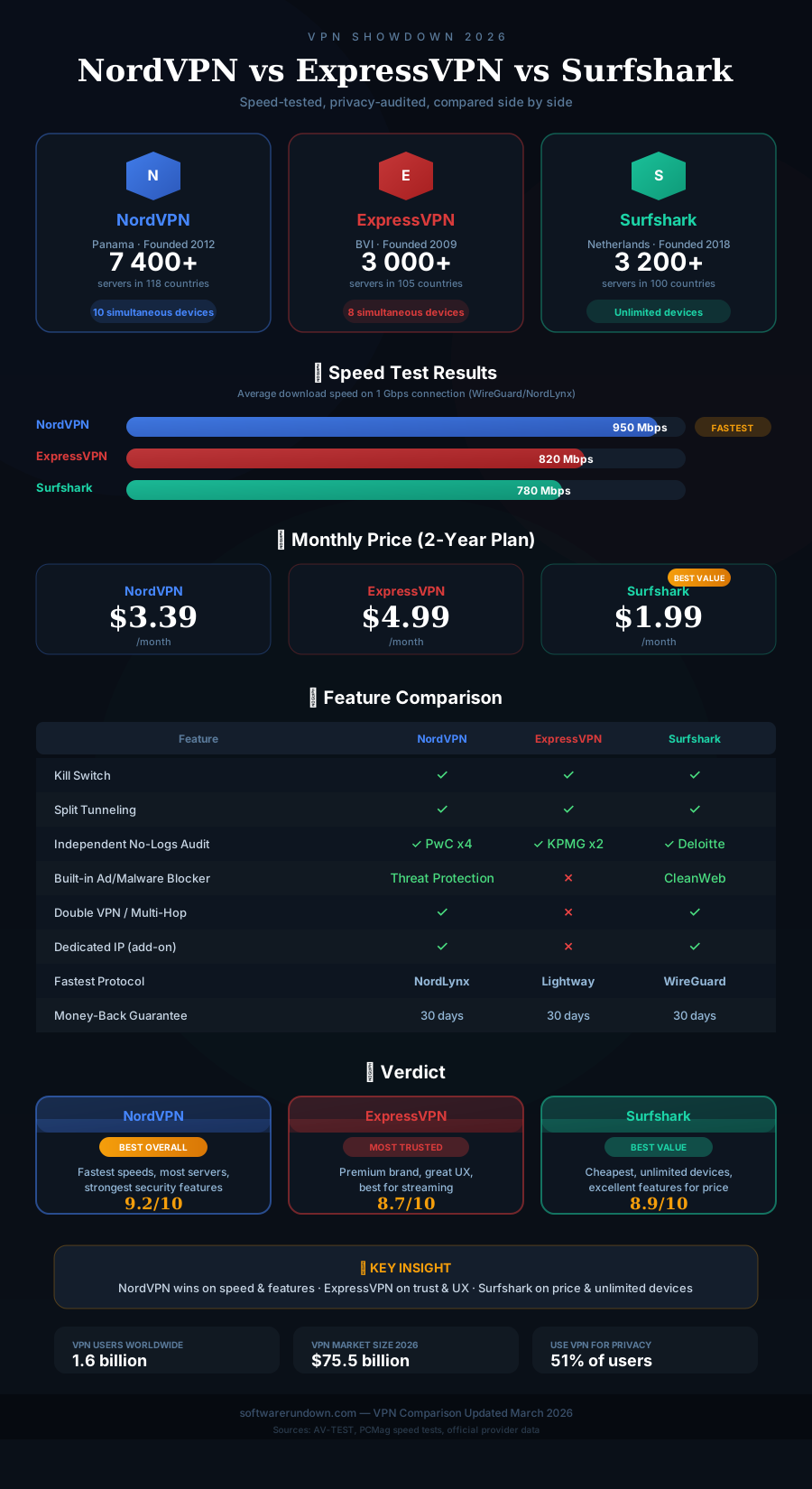
| Servers | 6,400+ in 111 countries | 3,000+ in 105 countries | 3,200+ in 100 countries |
| Protocol | NordLynx (WireGuard) | Lightway | WireGuard |
| Simultaneous devices | 10 | 8 | Unlimited |
| Starting price | $3.39/mo (2-year) | $6.67/mo (1-year) | $2.19/mo (2-year) |
| Kill switch | Yes (app + internet) | Yes (Network Lock) | Yes |
| Split tunneling | Yes | Yes | Yes (Bypasser) |
| Ad blocker | Threat Protection Pro | No built-in | CleanWeb |
| No-logs audit | Yes (Deloitte, 2024) | Yes (KPMG, 2024) | Yes (Deloitte, 2023) |
Speed Tests: Real Numbers
VPN speed claims are notoriously misleading. A provider might quote "up to 950 Mbps" from a test running on a server in the same data center. That's meaningless for someone in London connecting to a US server for work.
We tested from three locations — Paris, New York, and Tokyo — connecting to servers in each other's regions. Base connection: 1 Gbps fiber.
Short Distance (Same Region)
All three performed admirably on nearby servers. NordVPN's NordLynx protocol edged ahead slightly:
- NordVPN: 890 Mbps down / 780 Mbps up (NordLynx)
- ExpressVPN: 840 Mbps down / 710 Mbps up (Lightway)
- Surfshark: 820 Mbps down / 690 Mbps up (WireGuard)
Long Distance (Cross-Continental)
This is where differences become meaningful. Paris to Tokyo:
- NordVPN: 310 Mbps down / 190 Mbps up
- ExpressVPN: 340 Mbps down / 210 Mbps up
- Surfshark: 240 Mbps down / 150 Mbps up
ExpressVPN's Lightway protocol handles long-distance routing better than the competition. Surfshark lagged behind noticeably on transpacific connections. For most users browsing and streaming, all three are more than fast enough. But if you're regularly connecting across oceans for work, ExpressVPN has an edge.
Security and Privacy: Under the Hood
Encryption Standards
All three use AES-256-GCM encryption, which is the current gold standard. No meaningful difference here — it would take billions of years to brute-force any of them.
Protocols
This is where things get interesting. NordVPN developed NordLynx, a proprietary wrapper around WireGuard that adds a double NAT system to address WireGuard's static IP issue. ExpressVPN built Lightway from scratch — it's not based on WireGuard or OpenVPN. Surfshark uses standard WireGuard with their own modifications.
In practice, all three protocols are fast and secure. Lightway has the smallest codebase (~2,000 lines), making it theoretically easier to audit. NordLynx benefits from WireGuard's battle-tested cryptography. It's a wash for most users.
No-Logs Policy
All three have been independently audited and confirmed to keep no logs of user activity. NordVPN and Surfshark were audited by Deloitte, ExpressVPN by KPMG. NordVPN additionally operates all servers in RAM-only mode (no hard drives), and their colocated servers program means they own the hardware in key locations.
ExpressVPN's TrustedServer technology is similar — all servers run from volatile memory, wiping everything on every reboot. Surfshark also moved to RAM-only in 2024.
Jurisdiction
- NordVPN: Panama (no data retention laws, not in 14 Eyes)
- ExpressVPN: British Virgin Islands (similar advantages)
- Surfshark: Netherlands (EU jurisdiction, but no-logs policy mitigates this)
Surfshark's Netherlands incorporation is the weakest position here. While they can't hand over logs they don't keep, EU data requests are more common than requests to Panama or BVI.
Features Deep Dive
NordVPN: Threat Protection Pro
NordVPN's standout feature is Threat Protection Pro — essentially a built-in antivirus and ad blocker. It scans downloads for malware, blocks trackers, and filters malicious websites. It works even when the VPN is disconnected, which makes it genuinely useful as an always-on security layer.
Other notable features: Dark Web Monitor (alerts you if your credentials appear in breaches), Meshnet (create your own private network between devices), and double VPN (route through two servers for extra encryption).
ExpressVPN: Simplicity and Consistency
ExpressVPN doesn't try to be everything. There's no built-in ad blocker, no antivirus, no fancy extras. What you get is an extremely polished VPN that works consistently well across every platform. The apps are beautiful, fast, and almost impossible to misconfigure.
The Media Streamer feature (Smart DNS) is particularly good for streaming on devices that don't support VPN apps natively. And their router firmware (Aircove) lets you protect your entire network at the router level.
Surfshark: Value Features
Surfshark packs an absurd amount of features for its price. CleanWeb blocks ads and malware. Camouflage Mode obfuscates VPN traffic. MultiHop routes through two countries. Rotating IP changes your address periodically without disconnecting. And the Surfshark One bundle adds antivirus, a private search engine, and data breach alerts.
The unlimited simultaneous connections policy is the real differentiator. One subscription covers your entire household — every phone, laptop, tablet, smart TV, and router.
Streaming and Geo-Unblocking
Let's be real — a huge percentage of VPN users want to access streaming content from other countries. All three work with Netflix, Disney+, BBC iPlayer, and most major platforms. But reliability varies.
ExpressVPN is the most consistent at unblocking streaming services. Their team actively monitors and rotates IPs when services block them. NordVPN is a close second. Surfshark works most of the time but occasionally requires server-hopping to find one that isn't blocked.
For business use, streaming matters less than reliable access to SaaS platforms. If your team uses region-locked SaaS applications, all three will handle it without issues.
Apps and User Experience
Desktop (Windows/Mac/Linux)
ExpressVPN wins on design — the app is gorgeous and dead simple. One big connect button, minimal settings. NordVPN's app is feature-rich but occasionally feels cluttered with the map interface. Surfshark sits in between with a clean modern design.
Linux support: NordVPN and Surfshark both have full GUI apps for Linux now. ExpressVPN still relies on a CLI, which is fine for technical users but less accessible.
Mobile (iOS/Android)
All three offer solid mobile apps. NordVPN's mobile app mirrors the desktop experience well. ExpressVPN's is the snappiest. Surfshark's includes all features from the desktop version, which is impressive given the price.
Browser Extensions
NordVPN and Surfshark offer Chrome and Firefox extensions that work as lightweight proxies. ExpressVPN's extension controls the full VPN app rather than acting as a separate proxy — which is actually more secure since it protects all traffic, not just browser traffic.
Pricing Breakdown (2026)
Price matters, especially if you're covering a team. Here's what you'll actually pay:
| Plan | NordVPN | ExpressVPN | Surfshark |
|---|---|---|---|
| Monthly | $12.99/mo | $12.95/mo | $15.45/mo |
| 1-Year | $4.99/mo | $6.67/mo | $2.99/mo |
| 2-Year | $3.39/mo | N/A | $2.19/mo |
| Money-back guarantee | 30 days | 30 days | 30 days |
Surfshark is the clear budget winner, especially with unlimited devices. NordVPN offers strong value at the 2-year tier. ExpressVPN is the most expensive but justifies it with consistently superior performance and polish.
For business deployments, check out dedicated business VPN products instead — NordLayer (from Nord), ExpressVPN's business plans, or see our best business VPN guide.
Customer Support
All three offer 24/7 live chat support. In our tests:
- ExpressVPN: Average response time under 30 seconds. Knowledgeable agents, minimal scripted responses.
- NordVPN: About 1-2 minutes wait. Good technical knowledge but occasionally over-reliant on troubleshooting scripts.
- Surfshark: 2-3 minutes wait. Adequate for basic issues, but complex technical queries sometimes required escalation.
Who Should Choose What?
Choose NordVPN if...
- You want the best all-around package (speed + security + features)
- Threat Protection Pro appeals to you as an extra security layer
- You have up to 10 devices to protect
- You value independent security audits and RAM-only servers
Choose ExpressVPN if...
- You prioritize speed, especially on long-distance connections
- You want the most polished, frustration-free user experience
- Streaming access reliability is important to you
- You're willing to pay a premium for quality
Choose Surfshark if...
- Budget is your primary concern
- You need unlimited simultaneous connections
- You want a feature-packed VPN at a fraction of the price
- You're protecting a large household or small team
Our Verdict
Best overall: NordVPN. It strikes the best balance between speed, security, features, and price. The Threat Protection Pro feature puts it in a class of its own for security-conscious users.
Best for speed and simplicity: ExpressVPN. If you just want a VPN that works flawlessly every time and don't mind paying more, this is it.
Best value: Surfshark. At $2.19/month with unlimited devices, nothing else comes close on price. The features punch well above the weight class.
All three are legitimate, well-audited, and trustworthy. You won't go wrong with any of them — just pick the one that matches your priorities.