"Should I use Docker or Kubernetes?" is one of those questions that reveals a fundamental misunderstanding — and it's nobody's fault. The DevOps ecosystem loves jargon, and the relationship between Docker and Kubernetes is genuinely confusing for anyone who hasn't deployed containers in production.
Here's the short version: Docker packages your application into containers. Kubernetes manages those containers at scale. They're not alternatives — they're complementary tools that solve different problems at different stages of your infrastructure journey.
Now let's unpack that properly.
Docker: Packaging Your Application
What Docker Actually Does
Docker creates containers — lightweight, isolated environments that package your application with everything it needs to run: code, runtime, libraries, and system tools. A Docker container behaves the same way whether it's running on your laptop, a CI/CD server, or a production machine.
Before Docker, the "it works on my machine" problem was a constant headache. Developers would build software against one version of Python/Node/Java, QA would test on a slightly different version, and production would have yet another configuration. Containers eliminated this entire class of problems.
Key Docker Concepts
- Dockerfile — A recipe that describes how to build your container image. Which base OS, what dependencies to install, which files to copy, which command to run.
- Image — The built artifact from a Dockerfile. Immutable, versioned, shareable. Think of it as a snapshot of your application and its environment.
- Container — A running instance of an image. You can run multiple containers from the same image.
- Docker Compose — A tool for defining and running multi-container applications. Define your web server, database, and cache in one YAML file, and
docker compose upstarts everything. - Docker Hub / Registry — Where you store and share images. Like npm for containers.
A Simple Example
Imagine you have a Node.js web application with a PostgreSQL database and a Redis cache. Without Docker, setting up a new developer's machine means installing Node (the right version), PostgreSQL (the right version), Redis, running database migrations, configuring environment variables, and hoping nothing conflicts with other projects.
With Docker Compose, the entire setup is:
docker compose upThat's it. One command. The Compose file describes all three services, their configurations, and how they connect. Every developer gets an identical environment in seconds.
When Docker Is Enough
Docker alone (without Kubernetes) is perfectly adequate for:
- Development environments — Docker Compose for local development is standard practice
- Small production deployments — A single server running a few containers via Docker Compose
- CI/CD pipelines — Build and test in containers for reproducibility
- Single-server applications — If your app runs on one machine, you don't need an orchestrator
- Microservices on a single host — Docker Compose can manage multiple services on one server
Many successful applications run on a single server with Docker Compose and a reverse proxy (Traefik or Nginx). Don't let anyone tell you this isn't "production-ready." If your traffic fits on one machine, keep it simple.
Kubernetes: Managing Containers at Scale
What Kubernetes Actually Does
Kubernetes (K8s) is a container orchestration platform. Once you have containers (typically built with Docker), Kubernetes handles:
- Scheduling — deciding which server runs which container
- Scaling — automatically adding or removing container instances based on load
- Self-healing — restarting failed containers, replacing unhealthy nodes
- Load balancing — distributing traffic across container instances
- Rolling updates — deploying new versions without downtime
- Service discovery — containers finding and communicating with each other
- Secret management — securely distributing configuration and credentials
Key Kubernetes Concepts
- Pod — The smallest unit in Kubernetes. Usually one container, sometimes a few tightly coupled containers.
- Deployment — Describes the desired state for your pods (how many replicas, which image version, resource limits).
- Service — A stable network endpoint that routes traffic to pods. Pods come and go; Services provide a permanent address.
- Ingress — Routes external HTTP traffic to the right Service based on hostnames and paths.
- Namespace — A way to organize and isolate resources within a cluster.
- Helm — A package manager for Kubernetes. Helm charts bundle all the YAML files needed to deploy an application.
When You Actually Need Kubernetes
Kubernetes adds significant complexity. You need it when:
- You're running on multiple servers — If your application spans 3+ machines, you need something to coordinate them. That's Kubernetes.
- You need automatic scaling — Traffic spikes require adding instances automatically. Kubernetes' Horizontal Pod Autoscaler does this.
- High availability is non-negotiable — Kubernetes reschedules containers when nodes fail, maintaining your desired replica count.
- You deploy frequently — Rolling updates and canary deployments are built into Kubernetes.
- You run many services — When you have 20+ microservices, manually managing Docker Compose files across servers becomes unmanageable.
- Your team is big enough — You need at least one person who understands Kubernetes well. For a company with 2-3 developers, that's a significant overhead.
Docker vs. Kubernetes: Comparison Table
| Aspect | Docker (Compose) | Kubernetes |
|---|---|---|
| Scope | Single host | Multi-host cluster |
| Scaling | Manual | Automatic (HPA) |
| Self-healing | Basic restart policies | Full (reschedules across nodes) |
| Load balancing | Basic (round-robin) | Advanced (Services, Ingress) |
| Networking | Simple (bridge, host) | Sophisticated (CNI plugins, network policies) |
| Learning curve | Low-moderate | High |
| Setup time | Minutes | Hours to days |
| Operational overhead | Low | High |
| Ideal team size | 1-10 developers | 10+ developers |
| Cost | Free + server costs | Free + cluster costs + operational costs |
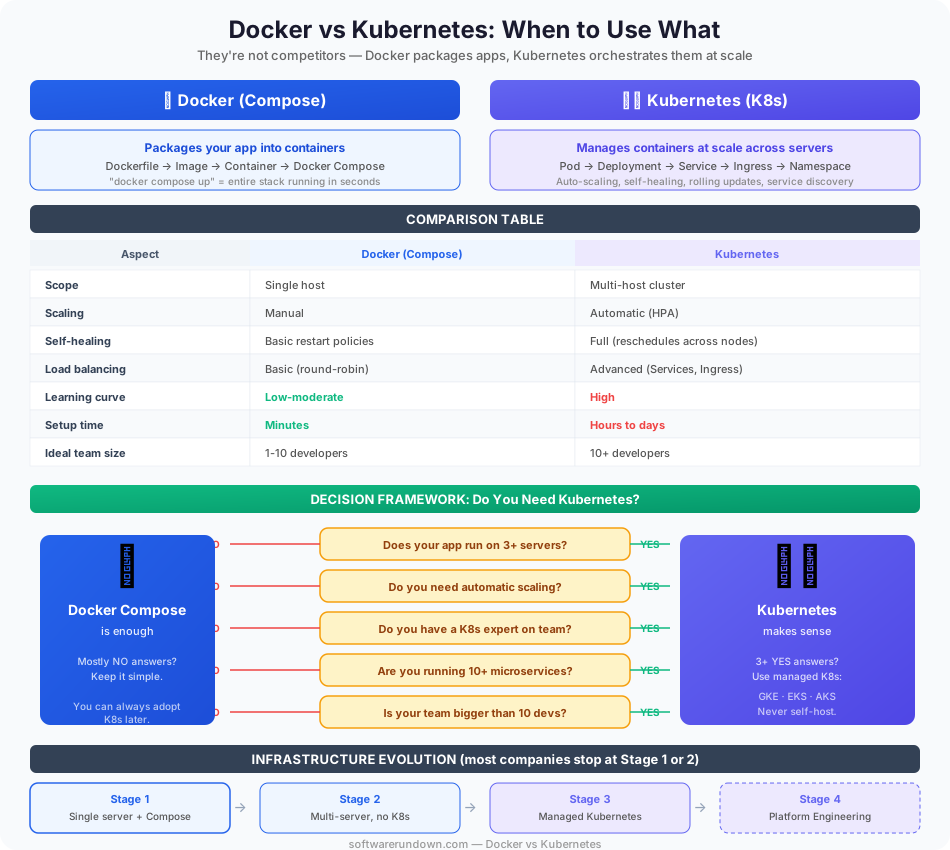
The Evolution of a Typical Infrastructure
Here's how most startups' infrastructure evolves:
Stage 1: Single Server with Docker Compose
You have one server running your application, database, and reverse proxy via Docker Compose. Deployments are docker compose pull && docker compose up -d. This works for thousands of concurrent users on a decent VPS. Many businesses never need to go beyond this.
Stage 2: Multiple Servers, Still No K8s
Traffic grows. You move your database to a managed service (RDS, Cloud SQL). You add a second application server behind a load balancer. Docker Compose on each server, deployments via CI/CD. This scales further than most people think.
Stage 3: Managed Kubernetes
You have 10+ services, 5+ servers, and manual coordination is becoming painful. You migrate to a managed Kubernetes service — EKS (AWS), GKE (Google Cloud), or AKS (Azure). The cloud provider manages the control plane; you manage the workloads.
Stage 4: Platform Engineering
Your K8s cluster is complex enough that developers can't deploy without help. You build an internal developer platform on top of Kubernetes — abstraction layers, deployment templates, self-service infrastructure. This is where tools like Backstage, ArgoCD, and Crossplane come in.
Most companies are perfectly served by Stage 1 or 2. The mistake is jumping to Stage 3 too early because "everyone uses Kubernetes."
Managed Kubernetes vs. Self-Hosted
If you do decide Kubernetes is right for you, do not run it yourself unless you have a dedicated platform team. Self-hosted Kubernetes is an operational burden that will consume engineering time better spent on your product.
Managed options:
- GKE (Google Kubernetes Engine) — The gold standard. Google invented Kubernetes, and GKE shows it. Autopilot mode is particularly appealing — Google manages the nodes too.
- EKS (Amazon Elastic Kubernetes Service) — More manual than GKE but integrates deeply with AWS. Fargate mode offers serverless containers.
- AKS (Azure Kubernetes Service) — Strong Azure AD integration. Free control plane (you only pay for nodes).
- DigitalOcean Kubernetes — Simplest managed K8s. Limited features compared to hyperscalers but much less complex.
Alternatives to Kubernetes
Before committing to Kubernetes, consider whether these simpler alternatives might be enough:
- Docker Swarm — Docker's built-in orchestrator. Much simpler than K8s, handles basic scaling and service discovery. Mostly deprecated in favor of K8s, but still functional for simple use cases.
- Fly.io — Deploy containers globally without managing infrastructure. Think of it as Kubernetes-level capability with Heroku-level simplicity.
- Railway / Render — PaaS platforms that deploy containers from Git. No infrastructure management at all.
- AWS ECS — Amazon's container service that's simpler than Kubernetes. If you're all-in on AWS, ECS with Fargate is worth considering.
- Kamal — A deployment tool from the Ruby on Rails team that deploys Docker containers to bare servers via SSH. No orchestrator needed. Surprisingly powerful for most web applications.
Decision Framework
Answer these questions honestly:
- Does your app run on more than 3 servers? No → Docker Compose is fine.
- Do you need automatic scaling? No → Docker Compose is fine.
- Do you have someone who knows Kubernetes? No → Don't adopt it yet.
- Are you running 10+ microservices? No → Docker Compose or a simple deployment tool.
- Is your team bigger than 10 developers? No → The operational overhead of K8s likely exceeds its benefits.
If you answered "Yes" to 3+ of these questions, Kubernetes makes sense. Otherwise, keep it simple. You can always adopt K8s later — premature infrastructure complexity is just as damaging as premature optimization.
Our Recommendation
Start with Docker and Docker Compose. Build your application, validate your product, grow your traffic. When Docker Compose on a single server or a small set of servers becomes a genuine bottleneck — not a theoretical one, a real one — then evaluate Kubernetes. And when you do, use a managed service.
The best infrastructure is the simplest one that solves your actual problems. Don't build for Google's scale when you have Google Sheets-level traffic. Ship your product, delight your users, and let the infrastructure evolve as the business demands it.