DevOps has become one of those terms that everyone uses but few agree on what it actually means. Ask ten people and you'll get ten different definitions — a culture shift, a set of tools, a job title, a methodology. The truth is that DevOps is all of those things, and understanding the full picture is what separates teams that genuinely improve from teams that just rename their IT department.
DevOps in Plain English
Traditionally, software development worked like an assembly line. Developers wrote code and threw it over the wall to the operations team, who figured out how to deploy and run it. When something broke in production, developers blamed ops for misconfiguring the environment, and ops blamed developers for writing fragile code. This handoff created delays, finger-pointing, and — most importantly — slower, less reliable software delivery.
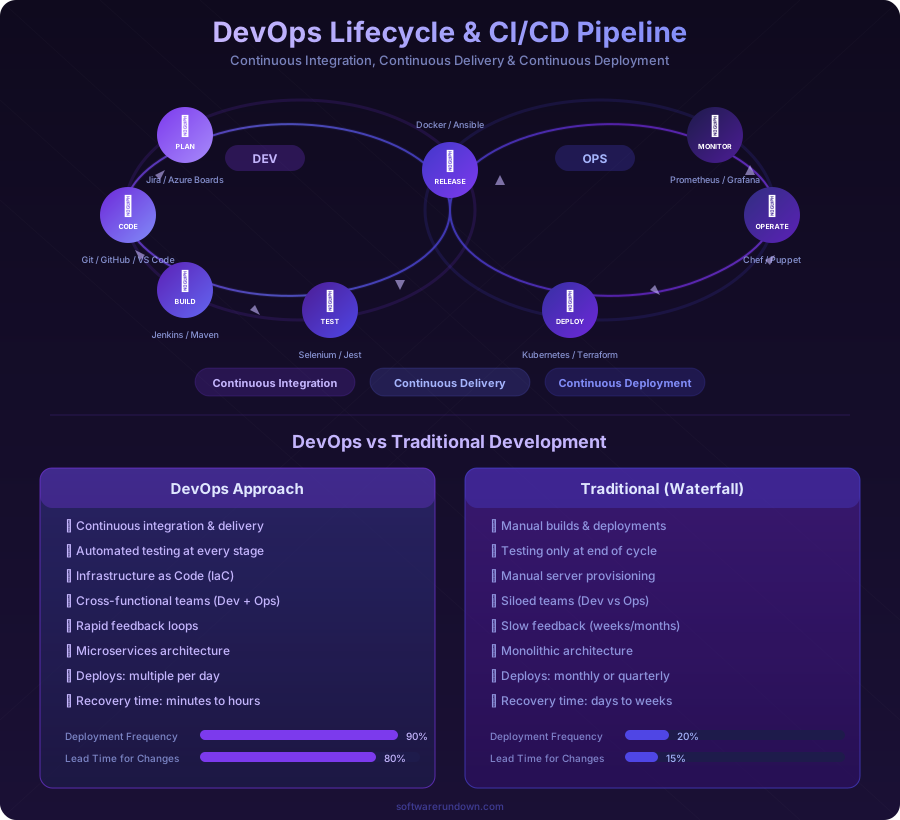
DevOps removes the wall. It's a set of practices, cultural philosophies, and tools that bring development and operations teams together so they share responsibility for the entire software lifecycle — from writing code to deploying it, monitoring it in production, and responding when things go wrong.
The result, when done well, is that teams ship software more frequently, with fewer failures, and recover faster when failures do occur.
The Three Pillars of DevOps
1. Culture
This is where most DevOps transformations succeed or fail. The technical practices matter, but they won't stick without the right mindset:
Shared ownership: Developers care about what happens after deployment. Ops engineers participate in design decisions. Everyone is responsible for reliability.
Blameless postmortems: When incidents happen (and they will), the focus is on understanding what went wrong systemically, not who made the mistake. Blaming individuals drives errors underground; blameless analysis surfaces them so they can be prevented.
Collaboration over silos: Cross-functional teams that include developers, ops engineers, QA, and security work together throughout the software lifecycle rather than handing off between phases.
Continuous improvement: Every process, tool, and practice is subject to review and improvement. Retrospectives aren't just for agile sprints — they apply to deployment pipelines, monitoring setups, and incident response procedures.
2. Practices
DevOps practices are the concrete things teams do differently:
Continuous Integration (CI): Developers merge their code changes into a shared repository frequently — ideally multiple times per day. Each merge triggers an automated build and test suite that catches integration problems early.
Continuous Delivery (CD): Code that passes CI is automatically prepared for deployment to production. With continuous delivery, any passing build can be deployed at any time. With continuous deployment (a step further), every passing build is deployed automatically.
Infrastructure as Code (IaC): Server configurations, network settings, and cloud resources are defined in version-controlled code (Terraform, CloudFormation, Pulumi) rather than configured manually. This makes infrastructure reproducible, testable, and auditable.
Monitoring and Observability: Production systems are instrumented with metrics, logs, and traces that make behavior visible. Teams don't wait for users to report problems — they detect anomalies proactively and often fix issues before users notice.
Automated Testing: Unit tests, integration tests, end-to-end tests, and security scans run automatically in the CI pipeline. Manual testing becomes the exception for exploratory and usability testing, not the bottleneck for every release.
For a hands-on look at CI/CD tooling, our best CI/CD tools 2026 guide compares the leading platforms.
3. Tools
DevOps tools automate the practices described above. The toolchain typically includes:
Version Control: Git (hosted on GitHub, GitLab, or Bitbucket) is the foundation. Every change is tracked, reviewed, and reversible.
CI/CD Pipelines: GitHub Actions, GitLab CI, Jenkins, CircleCI, or similar platforms automate building, testing, and deploying code.
Containerization: Docker packages applications and their dependencies into portable containers that run identically everywhere. This eliminates the "works on my machine" problem. See our Docker vs Kubernetes comparison for more on container orchestration.
Orchestration: Kubernetes manages containers at scale — scheduling, scaling, health checking, and rolling updates across clusters of machines.
Infrastructure as Code: Terraform, AWS CloudFormation, or Pulumi define infrastructure declaratively.
Configuration Management: Ansible, Chef, or Puppet ensure servers are configured consistently.
Monitoring: Prometheus, Grafana, Datadog, or New Relic provide visibility into system health and performance.
Incident Management: PagerDuty, Opsgenie, or Incident.io route alerts and coordinate incident response.
The DevOps Lifecycle
DevOps is often represented as an infinity loop, reflecting its continuous nature:
Plan → Code → Build → Test → Release → Deploy → Operate → Monitor → Plan...
Each stage feeds into the next, and learnings from operations and monitoring feed back into planning and development. The loop never stops — there's always the next improvement, the next feature, the next optimization.
Plan
Product managers, developers, and ops engineers collaborate on what to build and how it will work in production. This isn't just feature planning — it includes capacity planning, reliability targets, and deployment strategy.
Code
Developers write code in short-lived feature branches, using peer code review (pull requests) to maintain quality. Pair programming and mob programming are common in DevOps teams.
Build and Test
Automated CI pipelines compile code, run tests, perform static analysis, and scan for security vulnerabilities. Failures are caught in minutes, not days.
Release and Deploy
CD pipelines package the application, deploy it to staging environments for final validation, and promote it to production. Deployment strategies like blue-green, canary, or rolling updates minimize risk.
Operate and Monitor
The application runs in production with full observability. Alerts fire when metrics deviate from normal. Runbooks guide incident response. Auto-scaling handles traffic changes.
Implementing DevOps: A Realistic Roadmap
You don't adopt DevOps overnight. Here's a phased approach that works for most teams:
Phase 1: Foundation (Months 1-3)
Version control everything. If any code, configuration, or infrastructure definition isn't in Git, fix that first.
Set up basic CI. Automate builds and run unit tests on every commit. GitHub Actions or GitLab CI can be configured in a day. Start simple — a passing build is better than a perfect pipeline you never finish.
Automate deployments. Replace manual deployment procedures with scripts. They don't need to be sophisticated — even a bash script that SSHs into a server and pulls the latest code is better than someone following a Wiki page step by step.
Phase 2: Acceleration (Months 3-6)
Containerize your application. Package it in Docker containers to eliminate environment inconsistencies. Write Dockerfiles for all services.
Expand your test suite. Add integration tests and API tests to your CI pipeline. Aim for enough coverage that you trust a green pipeline to be deployable.
Implement Infrastructure as Code. Start with your cloud infrastructure — define servers, databases, and networking in Terraform or similar. Stop making manual changes in the cloud console.
Phase 3: Maturity (Months 6-12)
Adopt Kubernetes (if appropriate). For teams running multiple services, Kubernetes provides orchestration, scaling, and self-healing. For a single application, it may be overkill — evaluate honestly.
Build comprehensive observability. Implement structured logging, application metrics, and distributed tracing. Create dashboards for key business and technical metrics. Set up alerting with meaningful thresholds (not just "CPU > 80%").
Practice incident management. Establish on-call rotations, incident response procedures, and blameless postmortem processes. Run game days (simulated failures) to test your team's response.
Phase 4: Optimization (Ongoing)
Measure and improve. Track the four DORA metrics: deployment frequency, lead time for changes, change failure rate, and time to restore service. These are the best indicators of DevOps performance.
Shift security left. Integrate security scanning (SAST, DAST, dependency checking) into CI pipelines. This is the "DevSecOps" extension of DevOps that makes security a shared responsibility rather than a gate at the end.
Reduce toil. Continuously identify manual, repetitive tasks and automate them. If an engineer does something more than twice, it should be a script or a pipeline stage.
DevOps Metrics That Matter
The DORA (DevOps Research and Assessment) team identified four key metrics that correlate with software delivery performance:
Deployment Frequency: How often does your team deploy to production? Elite teams deploy multiple times per day. Low performers deploy monthly or less.
Lead Time for Changes: How long from code commit to production deployment? Elite teams measure this in hours. Low performers measure it in months.
Change Failure Rate: What percentage of deployments cause a failure in production? Elite teams keep this under 15%. Low performers see 46-60%.
Time to Restore Service: When a failure occurs, how long until service is restored? Elite teams recover in under an hour. Low performers take days to weeks.
These metrics provide a clear, measurable framework for tracking DevOps progress without getting lost in vanity metrics.
Common Mistakes
Tool-first thinking: Buying Kubernetes, Terraform, and a fancy monitoring stack doesn't make you DevOps. Start with culture and practices; tools follow.
Renaming without changing: Calling your sysadmins "DevOps engineers" without changing how development and operations collaborate is organizational theater.
Automating a broken process: Automating a deployment that takes 47 manual steps doesn't give you DevOps — it gives you automated chaos. Simplify the process first, then automate it.
Ignoring security: DevOps without security considerations creates fast, insecure delivery pipelines. Build security into the process from the start.
Is DevOps Right for Every Team?
DevOps practices benefit any team that builds and operates software, but the specific implementation varies dramatically. A five-person startup will look very different from a 500-person enterprise. A team building a SaaS product has different needs than one maintaining internal tools.
Start where you are. If your deployments are manual and terrifying, automate them. If your teams don't talk to each other, create shared channels and joint planning sessions. If you can't tell when your production system is unhealthy, add monitoring. Every step toward shorter feedback loops and shared responsibility is a step in the right direction.
DevOps is a journey, not a destination. The teams that get the most from it are the ones that commit to continuous improvement — not the ones that declare victory after installing Jenkins.