Cyberattacks are no longer a matter of "if" — they're a matter of "when." In 2026, organizations of all sizes face a threat landscape that has grown more sophisticated, automated, and relentless. Whether you run a five-person startup or a distributed enterprise, your IT infrastructure is a target. The good news? Hardening your defenses doesn't require a blank-check security budget. It requires discipline, the right priorities, and a structured approach.
Below are 10 concrete steps — drawn from current NIST frameworks, CIS Controls, and real-world incident response data — that any organization can act on today. For broader context on why this matters financially, see our deep-dive on the average cost of a cyberattack in 2026. And if you're building a full security program from scratch, our complete cybersecurity guide for 2026 covers the strategic layer in detail.
- Conduct a security audit
- Classify sensitive data
- Enforce MFA everywhere
- Harden endpoints
- Segment your network
- Patch and update religiously
- Implement a 3-2-1 backup strategy
- Train employees on security awareness
- Deploy monitoring and detection (SIEM/SOC)
- Create an incident response plan
1. Conduct a Security Audit
You can't defend what you don't understand. A security audit is the baseline — a systematic review of every asset, access point, configuration, and policy in your environment. Think of it as a complete inventory of your attack surface before an adversary maps it for you.
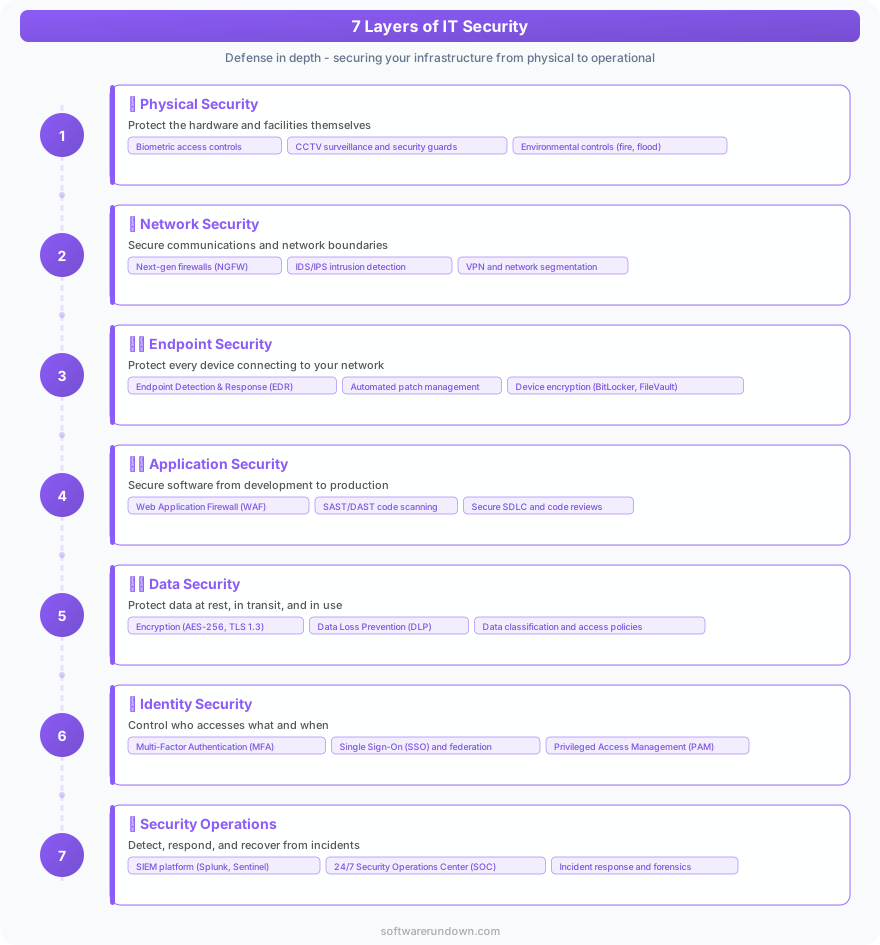
A thorough audit covers three domains: technical (network scans, vulnerability assessments, penetration tests), procedural (access control policies, onboarding/offboarding procedures, software approval workflows), and compliance (GDPR, SOC 2, ISO 27001 — whichever frameworks apply to your industry).
What to prioritize in your first audit
If you're running your first formal audit, start with external exposure. Run an external vulnerability scan using tools like Nessus, Qualys, or OpenVAS to identify publicly reachable services, open ports, and known CVEs on your infrastructure. Then move inward: review Active Directory permissions, check for stale accounts, and audit which third-party services have OAuth access to your systems. The findings from this first pass will drive the rest of your security roadmap.
2. Classify Sensitive Data
Not all data is equal. Customer PII, financial records, source code, and employee health information carry very different risk profiles and regulatory obligations. Without a formal classification scheme, security controls end up either over-applied (expensive and friction-heavy) or under-applied (dangerous).
A practical classification model uses four tiers: Public, Internal, Confidential, and Restricted. Public data can be freely shared. Internal data is for employees only. Confidential data — customer records, contracts, financial projections — requires encryption at rest and in transit, strict access controls, and audit logging. Restricted data (cryptographic keys, credentials, healthcare records) gets the highest level of protection with the narrowest access.
Automating data discovery
Manual classification at scale is unrealistic. Tools like Microsoft Purview, Varonis, or Nightfall use machine learning to scan repositories, cloud storage buckets, and email archives for sensitive content patterns — credit card numbers, social security numbers, API keys left in code. Run discovery scans quarterly, and integrate classification checks into your CI/CD pipeline so new code doesn't accidentally commit secrets to version control.
3. Enforce MFA Everywhere
Credential theft drives the majority of initial access in breach reports year after year. Passwords — even strong ones — are not sufficient. Multi-factor authentication (MFA) is the single highest-ROI control you can deploy, and in 2026, there is no defensible reason to leave any system without it.
The priority order: start with your identity provider (Okta, Azure AD, Google Workspace), then email, then VPN, then any admin consoles (AWS, Azure, GCP, your hosting provider). Hardware tokens (FIDO2/WebAuthn, YubiKey) offer the strongest protection and are phishing-resistant. Authenticator apps (Google Authenticator, Authy) are a solid second tier. SMS-based OTP is better than nothing but is vulnerable to SIM-swapping attacks — avoid it for privileged accounts.
Handling MFA fatigue attacks
A newer tactic attackers use is MFA fatigue: they flood a user with push notification requests until the user approves one out of frustration. Counter this by enabling number matching in your MFA app (the user must enter the code shown on the login screen, not just tap "approve") and setting up anomaly-based alerts for unusual authentication patterns.
4. Harden Endpoints
Every laptop, workstation, server, and mobile device that touches your network is a potential entry point. Endpoint hardening means reducing the attack surface of each device to the minimum necessary for its function.
The core checklist: enforce full-disk encryption (BitLocker on Windows, FileVault on macOS), deploy an endpoint detection and response (EDR) solution rather than legacy antivirus, disable unnecessary services and ports at the OS level, apply application allowlisting on high-risk machines, and enforce a standard secure configuration baseline using tools like CIS Benchmarks. For remote workforces, ensure all devices are enrolled in mobile device management (MDM) before they connect to company resources.
The privileged access workstation model
For administrators who manage servers, network devices, or cloud infrastructure, consider deploying dedicated Privileged Access Workstations (PAWs) — isolated machines used exclusively for administrative tasks, with no internet browsing, email, or general-purpose software installed. The risk reduction is significant: even if an admin's primary laptop is compromised, the attacker can't pivot to critical systems from a machine they don't control.
5. Segment Your Network
Flat networks are a gift to attackers. Once a threat actor gains access to one machine on a flat network, lateral movement to every other system is trivial. Network segmentation creates internal boundaries — VLANs, subnets, microsegmentation — that contain breaches and slow attackers down long enough for detection systems to catch them.
Separate your network into logical zones at minimum: a DMZ for internet-facing services, a user network for workstations, a server network for internal applications, and a management network for network devices and servers that should only be accessible by administrators. Zero-trust principles extend this model further by treating every request as untrusted by default, regardless of network origin.
6. Patch and Update Religiously
The Verizon Data Breach Investigations Report consistently finds that a large percentage of exploited vulnerabilities had patches available for months — sometimes years — before the breach. Unpatched systems are low-hanging fruit. An attacker doesn't need a zero-day when your organization is running software with known CVEs.
Build a formal patch management process: define SLAs by severity (critical CVEs patched within 24-72 hours, high within 7 days, medium within 30 days), maintain a complete software asset inventory so nothing falls through the cracks, use automated patch deployment tools (WSUS, SCCM, Ansible, Jamf), and scan for unpatched vulnerabilities weekly. Don't forget firmware — network devices, printers, and IoT endpoints often run outdated firmware indefinitely because no one thinks to update them.
7. Implement a 3-2-1 Backup Strategy
Ransomware's leverage depends entirely on your desperation to recover your data. A solid backup strategy eliminates that leverage. The 3-2-1 rule is the industry standard: keep 3 copies of your data, on 2 different media types, with 1 copy stored offsite (or offline).
In practice for 2026: primary data lives on your production systems, a second copy is on a local NAS or backup server, and the third is in immutable cloud storage (AWS S3 Object Lock, Azure Immutable Blob Storage, Backblaze B2 with object lock enabled). Immutability is the critical word — ransomware increasingly targets backup systems specifically. An immutable backup cannot be encrypted or deleted by an attacker who compromises your environment.
Test your restores — not just your backups
Untested backups are a false sense of security. Schedule quarterly restore tests for critical systems, document recovery time objectives (RTO) and recovery point objectives (RPO), and treat a failed restore test as an incident. The only thing worse than no backup is discovering during a ransomware attack that your backups have been silently corrupted for six months.
8. Train Employees on Security Awareness
Technology controls are undermined instantly by a single employee who clicks a phishing link, shares credentials over chat, or plugs an unknown USB drive into a company laptop. The human layer is simultaneously the most vulnerable and the most improvable part of your security posture.
Effective security awareness training in 2026 is not an annual compliance video. It's continuous, contextual, and measurable. Run monthly phishing simulations using platforms like KnowBe4 or Proofpoint Security Awareness Training. Deliver micro-learning modules — three to five minutes — on topics like social engineering, secure password hygiene, recognizing deepfake voice and video scams, and safe handling of sensitive data. Track click rates on simulated phishing to measure improvement over time, and use failures as teachable moments rather than punitive ones.
9. Deploy Monitoring and Detection (SIEM/SOC)
You cannot respond to threats you cannot see. A Security Information and Event Management (SIEM) platform aggregates logs from across your environment — firewalls, endpoints, cloud services, applications — correlates them against threat intelligence feeds, and surfaces alerts for investigation. It's the nervous system of your security operation.
For organizations with an internal security team, platforms like Splunk, Microsoft Sentinel, or Elastic SIEM provide the infrastructure. For smaller teams, a managed detection and response (MDR) service offloads the 24/7 monitoring burden to a specialized SOC. Either way, establish baseline behavioral analytics — what does normal traffic look like? — so anomalies stand out. Key detection use cases to configure first: impossible travel logins, mass file access or encryption events (ransomware indicator), new administrative account creation, and outbound traffic to known C2 infrastructure.
10. Create an Incident Response Plan
When a breach occurs — and at some point, something will — every minute of uncoordinated response costs money, extends exposure, and amplifies damage. An incident response (IR) plan is the playbook your team reaches for when things go wrong. Organizations that rehearse their IR plans recover faster, contain breaches more effectively, and face lower regulatory penalties.
A complete IR plan defines six phases: preparation (team roles, contact lists, tooling), identification (how you detect and validate an incident), containment (short-term and long-term isolation procedures), eradication (removing the threat actor and their persistence mechanisms), recovery (restoring systems to normal operation), and lessons learned (post-incident review to prevent recurrence). Test the plan with tabletop exercises at least twice a year — walk your team through realistic breach scenarios and identify gaps before a real attacker finds them for you.
Who does what when everything is on fire
One of the most common failures in incident response is unclear ownership. Your IR plan must name specific individuals (and backups) for each role: incident commander, communications lead, technical lead, legal/compliance contact, and executive stakeholder. Have pre-drafted communication templates for internal notifications, customer disclosures, and regulatory filings ready to go — you don't want to write a breach notification letter at 2am under pressure.
Security Is an Ongoing Practice, Not a One-Time Project
These ten steps are not a checklist you complete once and archive. The threat landscape evolves continuously, and so must your defenses. Revisit your security audit annually, retrain employees as new attack vectors emerge, and treat every near-miss or minor incident as valuable intelligence about where your program needs to mature. The organizations that stay ahead of attackers are the ones that treat security as an operational discipline — measured, iterated, and owned at every level of the business.