Moving your infrastructure to the cloud is one of the most consequential decisions an IT team makes. Done right, it unlocks scalability, cuts costs, and opens the door to services that simply don't exist on-premises. Done poorly, it means downtime, budget overruns, and frustrated stakeholders who will remind you about it for years. The difference almost always comes down to preparation — and following a structured process from day one.
If you're planning a migration in 2026, here's the playbook. Seven steps, in order, no shortcuts.
- Audit your existing infrastructure
- Define your migration strategy
- Choose your cloud provider
- Plan migration in batches
- Migrate and test in staging
- Cut over to production
- Optimize and monitor post-migration
Step 1: Audit Your Existing Infrastructure
You cannot migrate what you haven't mapped. Before touching a single server, you need a complete, accurate picture of everything that runs in your current environment — hardware, software, dependencies, data flows, licensing agreements, and performance baselines.
Start with a discovery tool. Platforms like CloudAmize, Movere, or even AWS Migration Evaluator can automatically scan your environment and produce an inventory. What you're looking for isn't just a list of servers — it's the relationships between them. Which application talks to which database? Which workloads are latency-sensitive? Which services have compliance requirements that affect where data can reside?
One thing teams consistently underestimate: licensing. On-premises software often comes with licenses that don't transfer to cloud environments without renegotiation. SQL Server, Oracle, and various middleware products have specific cloud licensing models that can dramatically affect your cost projections if you don't account for them upfront.
The output of this step should be a structured asset inventory with each workload tagged by criticality, complexity, and migration readiness. That tagging will drive everything that follows.
Step 2: Define Your Migration Strategy
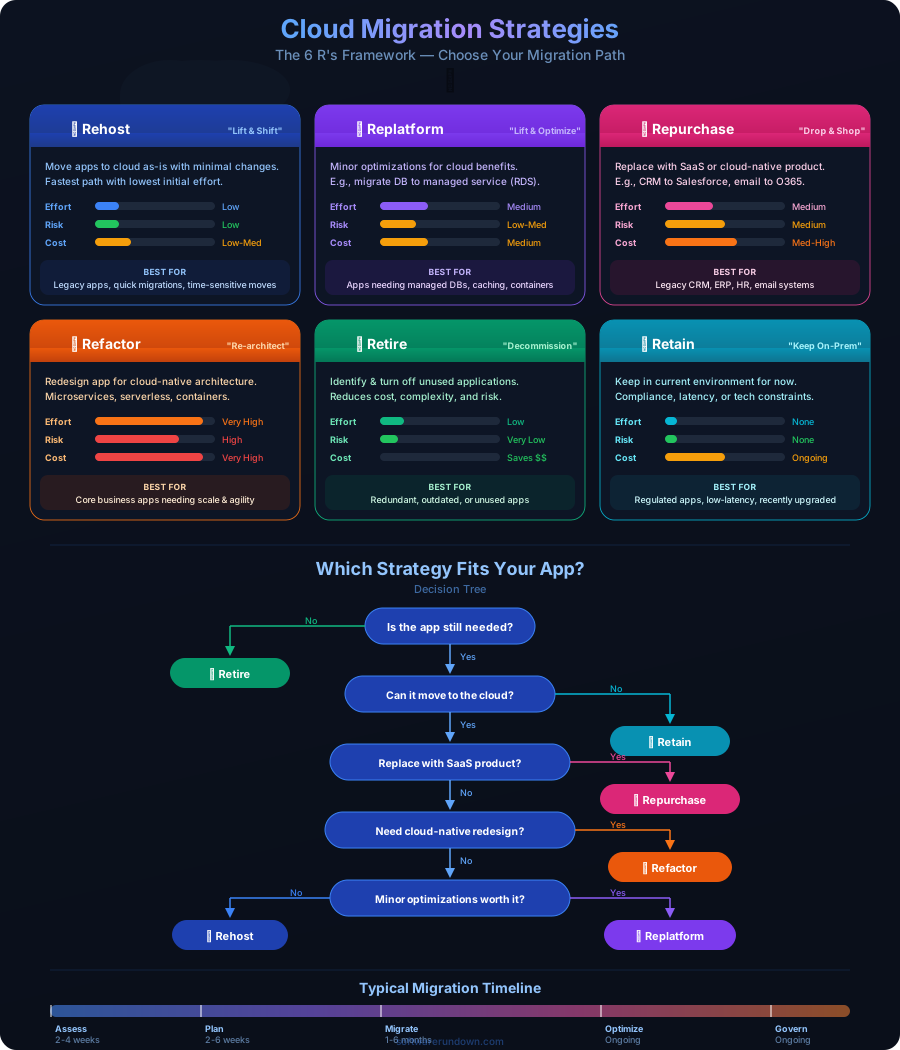
Not every workload belongs in the cloud the same way. The industry standard framework — often called the 6 Rs — gives you a vocabulary for making those decisions: Rehost, Replatform, Repurchase, Refactor, Retire, or Retain.
For most organizations in 2026, the practical choice comes down to three dominant approaches:
Lift-and-Shift (Rehost)
You take the workload exactly as it is and run it on cloud infrastructure. No code changes, no architectural redesign. This is the fastest path and the lowest initial risk — but it's also the one that captures the least value. You're paying cloud prices for an on-premises mindset. Lift-and-shift makes sense as a first step for legacy systems you plan to modernize later, or for workloads where time-to-cloud matters more than optimization.
Replatform
You make targeted changes to take advantage of cloud-native capabilities without fully redesigning the application. Migrating a self-managed MySQL database to Amazon RDS or Azure Database for MySQL is a classic example — same data model, same queries, but now the cloud provider handles patching, backups, and failover. Replatforming is often the sweet spot for mid-sized organizations: meaningful efficiency gains without the cost and risk of a full refactor.
Refactor / Rebuild
You redesign the application to be cloud-native — microservices, containers, serverless functions, event-driven architecture. This delivers the full promise of the cloud: elastic scaling, pay-per-use granularity, and dramatically reduced operational overhead. It's also the most expensive and time-consuming option. Reserve it for applications that are genuinely strategic and where the architecture is actively limiting your ability to move fast.
Your migration strategy document should assign one of these approaches to each workload in your inventory. That document is what you'll use to prioritize the migration waves in Step 4. For a broader view of how cloud architecture decisions intersect with costs, see our complete cloud computing guide for 2026.
Step 3: Choose Your Cloud Provider
AWS, Azure, and Google Cloud dominate the market — together they hold roughly 65% of global cloud spend. For most organizations, the choice between them is less about raw capability (all three can handle virtually any workload) and more about ecosystem fit, existing relationships, and where your team's expertise already lives.
AWS has the deepest service catalog and the largest partner ecosystem. If you're starting from scratch and want maximum optionality, it's the default choice for a reason. Azure integrates tightly with Microsoft 365, Active Directory, and the broader Microsoft toolchain — for enterprises already standardized on Microsoft, the operational savings from that integration are real and significant. Google Cloud leads on data analytics, machine learning infrastructure, and Kubernetes (it created it), making it the natural choice for data-intensive or ML-forward organizations.
A few factors that often get underweighted in provider selection: data egress costs, support tier pricing, and the geographic footprint of availability zones relevant to your users and your compliance requirements. Run a detailed total cost of ownership (TCO) analysis using each provider's pricing calculator before committing — the headline compute prices rarely tell the full story.
Also worth considering: multi-cloud. Approximately 87% of enterprises now use more than one cloud provider. Whether that's a deliberate strategy or just organizational entropy varies, but if you're planning for resilience or want to avoid vendor lock-in, it's a conversation worth having now rather than after you've committed your entire workload to a single platform.
Step 4: Plan Migration in Batches
Nobody migrates everything at once. Or rather, nobody does it successfully that way. Batch migration — sometimes called wave planning — is how you manage risk, learn from early migrations before they affect critical systems, and give your team time to build operational muscle before the stakes get high.
Structure your waves by risk and dependency. Wave 1 should be dev and test environments: low criticality, high tolerance for disruption, fast feedback loops. Wave 2 moves to non-critical production workloads — internal tools, lower-traffic applications, anything where a few hours of degraded performance won't trigger an SLA breach. By the time you reach Wave 3 (core production systems), your team should have done this enough times that surprises are the exception rather than the rule.
Each wave needs a defined scope, a timeline, a rollback plan, and success criteria. What does "done" look like? What metrics tell you the migrated workload is performing equivalently to its on-premises predecessor? Define those before you start, not after something goes wrong.
One often-overlooked element of wave planning: communication. Your stakeholders — internal users, business units, customers — need to know what's happening, when, and what to expect. A migration that goes technically smoothly but produces a flood of confused support tickets is still a failure from a business perspective.
Step 5: Migrate and Test in Staging
Before anything touches production, it runs in a staging environment that mirrors production as closely as possible. This isn't just good practice — in 2026, with infrastructure costs as visible as they are, it's how you catch the expensive mistakes before they become expensive incidents.
What to test in staging: functional correctness (does the application behave the same?), performance under load (use a tool like Apache JMeter or k6 to simulate realistic traffic patterns), failover and recovery (kill a node deliberately and verify your HA configuration works as expected), and security posture (network segmentation, IAM policies, encryption at rest and in transit).
Pay particular attention to latency. Applications that were designed around sub-millisecond on-premises network calls can behave unexpectedly when those calls now traverse a cloud network, even within the same availability zone. Identifying those dependencies in staging — and deciding whether to optimize the code, colocate the services, or accept the latency — is vastly cheaper than discovering them post-cutover.
Security testing at this stage deserves its own focus. Cloud misconfigurations remain one of the top causes of data breaches — exposed S3 buckets, overly permissive IAM roles, missing encryption on databases. Run a cloud security posture management (CSPM) scan against your staging environment before you call it ready. For a full treatment of security considerations in cloud environments, our cybersecurity guide for 2026 covers the threat landscape and mitigation strategies in detail.
Step 6: Cut Over to Production
The cutover is the moment everything becomes real. Your goal is to make it the most boring event in the project timeline — a planned, rehearsed, well-communicated transition that the team executes almost on autopilot because they've walked through it so many times.
Schedule cutovers during your lowest-traffic windows. For B2B applications, that typically means a weekend overnight window. For consumer applications, it might mean 3 AM on a Tuesday. Wherever possible, use a blue-green deployment model: stand up the new cloud environment in parallel with the old one, shift traffic gradually using weighted routing or feature flags, and keep the on-premises environment running and recoverable until you're confident the migration is stable.
Your cutover runbook should be a step-by-step document with owners, timing, validation checkpoints, and a clear decision point: if X happens, we roll back. Not "we discuss rolling back" — we roll back. Ambiguity during a live incident is how small problems become large ones.
Post-cutover, run an immediate smoke test against the production environment. Don't declare success and go to sleep. Have someone monitoring key metrics — error rates, latency, CPU and memory utilization — for at least 24 hours after cutover. Most post-migration issues surface within the first few hours of real production traffic.
Step 7: Optimize and Monitor Post-Migration
Migration is not the finish line. It's the starting line for a new operational model — one where the tools and practices you use to manage infrastructure need to evolve alongside the infrastructure itself.
The first priority post-migration is cost optimization. Most organizations significantly overprovision in their initial cloud deployment because they're replicating on-premises capacity allocations without accounting for the elasticity the cloud actually provides. Once you have two to four weeks of real production data, run a rightsizing analysis. AWS Compute Optimizer, Azure Advisor, and Google's Recommender all offer automated rightsizing recommendations. Reserved Instances or Committed Use Discounts for stable baseline workloads can cut compute costs by 30-40% compared to on-demand pricing.
For a detailed breakdown of how to model and control cloud spend over time, see our analysis of cloud hosting costs in 2026 — including how pricing models have shifted across major providers this year.
On the monitoring side, invest in observability early. The shift to cloud typically means a shift from infrastructure-centric monitoring (is the server up?) to application-centric observability (is the service performing as expected?). Platforms like Datadog, New Relic, or the native monitoring suites from your cloud provider can give you metrics, logs, and traces in a unified view. Set up alerting with meaningful thresholds — not just "CPU is above 80%" but "p99 latency for the checkout API is above 500ms" — so that your on-call rotation is responding to business-relevant signals rather than infrastructure noise.
Finally, build a culture of continuous optimization. Cloud environments are not static. New services launch regularly, pricing models evolve, and your application's usage patterns shift over time. Assign someone — or a team, depending on your scale — with explicit responsibility for cloud cost and performance optimization as an ongoing practice, not a one-time project.
The Migration Mindset
Seven steps makes it sound more linear than it usually is. In practice, audits reveal surprises that change your strategy. Provider evaluations surface constraints that reshape your wave plan. Staging tests uncover dependencies that push back your cutover date. That's not failure — that's the process working as intended.
The organizations that migrate successfully are the ones that treat cloud migration as a program, not a project. They staff it appropriately, give it executive sponsorship, and accept that the timeline will flex while holding firm on the quality gates. The ones that struggle are the ones that treat it as a technical task to be executed as quickly as possible and then handed off to operations.
The cloud rewards preparation. Give this process the attention it deserves, and the transition will be the foundation for years of infrastructure flexibility. Rush it, and you'll spend those same years cleaning up the consequences.