Choosing a communication platform for your team is one of those decisions that feels simple on the surface but shapes how your entire organization works. Slack, Microsoft Teams, and Discord each take a fundamentally different approach to the problem, and the right choice depends less on feature checklists and more on how your team actually communicates.
We've used all three extensively with distributed teams. Here's an honest comparison based on real-world experience, not marketing pages.
The Quick Verdict
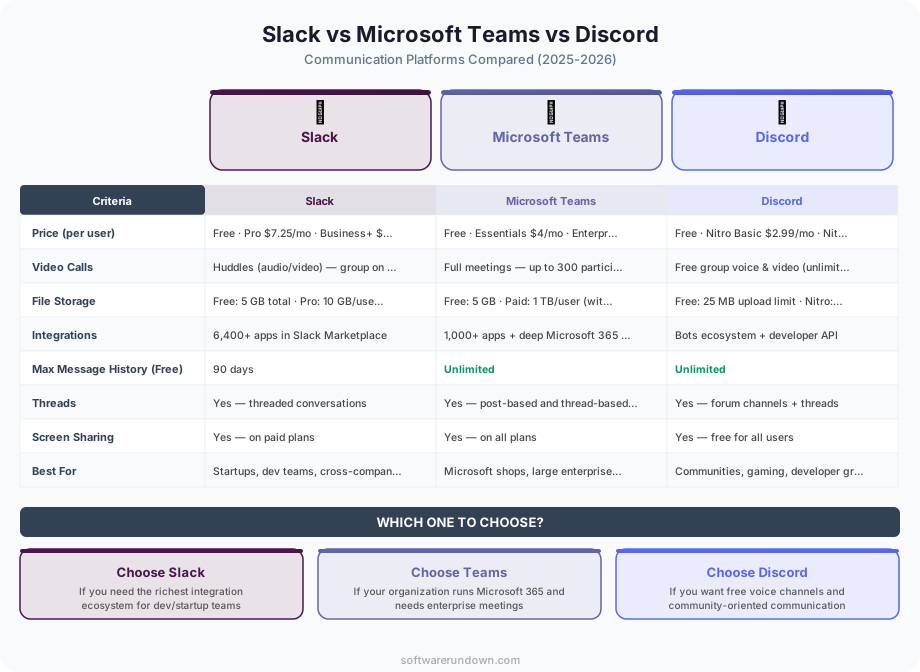
If you want the short version: Slack is the best standalone communication tool for most businesses. Microsoft Teams is the best choice if you're already in the Microsoft 365 ecosystem. Discord is the best option for small teams, communities, and organizations that value informal voice communication over structured workflows.
Now let's dig into why.
Messaging and Channels
Slack
Slack pioneered the channel-based communication model that both Teams and Discord have adopted. Channels can be public or private, organized by topic, project, or team. Threaded replies keep conversations focused without cluttering the main channel view.
Slack's search is genuinely excellent — you can find messages from years ago using natural language, filters by person, channel, date range, or file type. With Slack AI (available on Pro plans and above in 2026), you can ask questions like "what did Sarah say about the Q2 budget?" and get a synthesized answer with links to the original messages.
The biggest criticism? Channel sprawl. Without discipline, a large Slack workspace becomes a maze of half-abandoned channels. Slack has addressed this with Sections (folders for channels in your sidebar) and better channel management tools, but it's still a cultural problem more than a software one.
Microsoft Teams
Teams organizes communication around "Teams" (groups) and "Channels" within them. The structure maps naturally to organizational hierarchies — a Marketing team with channels for Social, Content, and Campaigns, for example.
Where Teams differs significantly is its tight integration with SharePoint and OneDrive. Every Team gets a SharePoint site, every channel gets a folder. Files shared in a conversation are automatically stored and accessible from both Teams and SharePoint. For document-heavy organizations, this is a major advantage.
The downside is that Teams' messaging experience feels heavier than Slack's. Threads work differently (they open in a side panel rather than inline), the editor is more complex (rich text by default, which slows down quick messages), and the search, while improved, still doesn't match Slack's speed or accuracy.
Discord
Discord's messaging is organized into servers (equivalent to workspaces) with text and voice channels. The interface is clean and fast, and the real-time feel is unmatched — messages appear instantly with no perceptible delay.
Discord's unique strength is voice channels. Unlike Slack huddles or Teams calls (which require someone to initiate and others to join), Discord voice channels are persistent rooms you can drop in and out of freely. This creates a "virtual office" atmosphere where you can see who's available and join a quick conversation without scheduling anything.
The limitation for business use is the lack of threaded conversations (Discord added a basic thread feature, but it's nowhere near as mature as Slack's) and limited enterprise features like compliance, eDiscovery, and SSO (available only on Enterprise plans).
Video Conferencing
Slack
Slack's native video calling (Huddles) is designed for quick, informal conversations — the audio equivalent of walking over to someone's desk. You can start a huddle in any channel or DM, and others can join at will. Screen sharing is included. For scheduled, formal meetings, Slack integrates with Zoom, Google Meet, and Teams rather than trying to replace them.
Verdict: Great for spontaneous calls, not a full meeting solution.
Microsoft Teams
This is where Teams flexes its muscles. The video conferencing experience is enterprise-grade: scheduled meetings with calendar integration, lobby controls, breakout rooms, live captions, recording with automatic transcription, and Copilot AI that generates meeting summaries and action items.
Teams meetings support up to 1,000 participants (10,000 in view-only webinar mode). The quality is consistently good, and features like background blur, noise suppression, and Together Mode (which places participants in a shared virtual space) are polished.
Verdict: The strongest meeting solution of the three, especially for enterprises. See also our best video conferencing software 2026 roundup.
Discord
Discord supports video calls and screen sharing within voice channels. Quality is good for small groups, but it lacks the enterprise features (recording, transcription, breakout rooms, calendar integration) that businesses need for formal meetings. The 25-person limit on video in voice channels is also restrictive for larger teams.
Verdict: Fine for casual calls, not suitable for formal business meetings.
Integrations and Ecosystem
Slack
Slack's app directory is the largest of the three, with over 2,600 integrations. Virtually every SaaS tool — from CRMs to project management platforms — has a Slack integration. The Workflow Builder lets non-technical users create simple automations (form submissions, approval flows, scheduled messages) without code.
Slack also supports custom integrations via its well-documented API, making it the most extensible option for teams with developers who want to build custom workflows.
Microsoft Teams
Teams integrates deeply with the Microsoft 365 suite — Word, Excel, PowerPoint, SharePoint, OneDrive, Planner, Power BI, and Power Automate. If your organization runs on Microsoft, this integration is seamless and genuinely productivity-boosting. You can co-edit a Word document inside a Teams tab without ever leaving the app.
Third-party integrations exist but the ecosystem is smaller and the quality is less consistent than Slack's. The Teams App Store has grown significantly, but many integrations feel like afterthoughts compared to their Slack counterparts.
Discord
Discord's integration ecosystem is bot-driven. There are thousands of bots available for moderation, music, games, and utilities, but business-focused integrations are limited. You won't find native integrations with Salesforce, HubSpot, or Asana. Custom bots are possible (Discord's API is developer-friendly), but you'll need engineering resources to build and maintain them.
Pricing Comparison
Here's where the math gets interesting:
Slack: Free (90-day message history), Pro at $8.75/user/month, Business+ at $15/user/month, Enterprise Grid (custom pricing).
Microsoft Teams: Free tier available, but the real value is in Microsoft 365 plans — Business Basic at $6/user/month, Business Standard at $12.50/user/month. If you're already paying for Microsoft 365, Teams is effectively free.
Discord: Free (very generous), Nitro at $9.99/user/month for enhanced features. No per-seat business pricing — Discord charges per user for Nitro, but there's no "business tier" equivalent to Slack Pro or Teams Business.
The pricing equation depends entirely on context. If you already pay for Microsoft 365, Teams costs nothing extra, making it extremely hard to justify adding Slack at $8.75-15/user/month. If you're a startup with no Microsoft dependency, Slack's free tier or Pro plan offers better value than buying into the entire Microsoft ecosystem just for chat.
Administration and Security
Slack
Business+ and Enterprise Grid plans offer robust admin controls: SSO via SAML, data loss prevention, e-discovery integrations, custom retention policies, and audit logs. The admin dashboard is well-designed and relatively easy to navigate. Slack is SOC 2 Type II, ISO 27001, and HIPAA-eligible (on Enterprise Grid).
Microsoft Teams
As part of the Microsoft 365 ecosystem, Teams benefits from Microsoft's enterprise security infrastructure — Azure AD for identity, Intune for device management, Information Barriers, Sensitivity Labels, and the Microsoft Purview compliance suite. For heavily regulated industries, Teams' compliance story is the strongest of the three.
Discord
Discord's admin and security capabilities have improved but still lag behind for business use. Server-level roles and permissions are flexible, but features like SSO, audit logging, and compliance tools are only available on the Enterprise plan (which requires contacting sales and is clearly oriented toward very large communities rather than typical businesses).
User Experience
This is subjective, but patterns emerge across teams we've observed:
Slack feels like a tool designed by people who use it every day. The keyboard shortcuts, the quick switcher (Cmd+K), the emoji reactions, the /slash commands — everything is optimized for speed. New users can be productive within hours.
Teams feels like a platform designed by committee (because it was). It does everything, but nothing feels as refined as the best-of-breed alternative. The UI has improved dramatically with the new client, but it still requires more clicks to accomplish basic tasks than Slack.
Discord feels like a social platform that businesses have co-opted. That's both its charm and its limitation. The tone is informal, the UI is playful, and the voice channels create a sense of presence that neither Slack nor Teams can match. But it doesn't feel "professional," which matters for some organizations.
Who Should Pick What
Choose Slack if: You want the best standalone communication experience, your team uses a variety of SaaS tools that need to integrate, or you prioritize async communication and searchability.
Choose Microsoft Teams if: Your organization already uses Microsoft 365, you need enterprise-grade video conferencing built in, or you operate in a heavily regulated industry where Microsoft's compliance stack is an asset.
Choose Discord if: You're a small team or community that values informal voice-based communication, you don't need enterprise security features, or budget is a primary concern.
The honest truth? All three are good enough for most teams. The switching costs between communication platforms are high (not in money, but in disruption and habit change), so the best time to make this decision carefully is before you've committed. Once your team has six months of conversations and workflows in any of these tools, migration becomes painful. Choose based on where your team lives today and where your organization is heading, not based on which demo impressed you most.