Phishing is the cyberattack equivalent of a con artist's oldest trick: pretend to be someone trustworthy and ask for something valuable. Despite decades of awareness campaigns, it remains the most successful attack vector in cybersecurity. The FBI's Internet Crime Complaint Center reported over $12 billion in losses from phishing and related social engineering attacks in 2025 alone.
The reason phishing persists isn't that people are stupid. It's that the attacks have gotten extremely sophisticated, and they exploit fundamental human psychology — trust, urgency, and helpfulness — that no amount of technical training can fully override.
What Is Phishing?
Phishing is a social engineering attack where an attacker impersonates a trusted entity to trick victims into revealing sensitive information (credentials, financial data, personal details) or taking a harmful action (clicking a malicious link, downloading malware, transferring money).
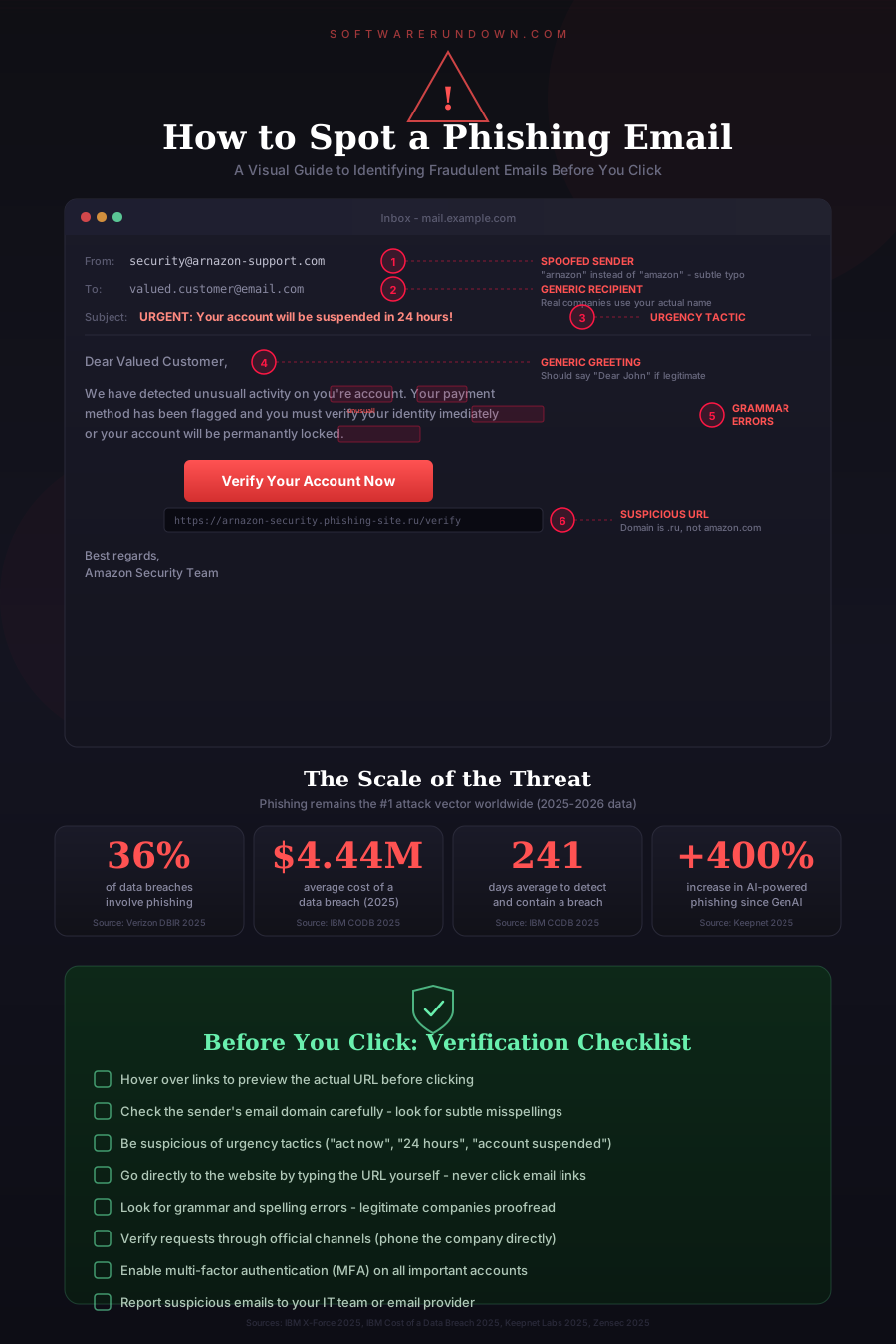
The attack typically arrives via email, but phishing now spans multiple channels:
Email phishing: The classic. Fake emails impersonating banks, SaaS providers, delivery services, or colleagues. Still accounts for the majority of attacks.
Spear phishing: Targeted attacks against specific individuals or organizations, using personalized information gathered from social media, company websites, or previous breaches to make the message convincing.
Whaling: Spear phishing aimed at executives (the "big fish"). These attacks often impersonate other executives, board members, or legal counsel and request urgent wire transfers or sensitive data.
Smishing: Phishing via SMS text messages. "Your package couldn't be delivered — click here to reschedule." The smaller screen and truncated URLs make it harder to spot fakes.
Vishing: Voice phishing via phone calls. The caller claims to be from your bank, the IRS, or tech support. AI-generated voice cloning has made vishing attacks significantly more convincing in 2025-2026.
Quishing: Phishing via QR codes. A malicious QR code in an email, poster, or document redirects to a credential-harvesting site. This bypasses email URL scanning because the link is encoded in an image.
How to Recognize Phishing Attempts
Modern phishing emails can be nearly indistinguishable from legitimate messages. But there are reliable tells if you know where to look:
Check the Sender Address Carefully
The display name can say "Microsoft Support" while the actual email address is [email protected]. Always check the full email address, not just the display name. Look for subtle misspellings, extra characters, or unusual domains.
However, be aware that even the "From" address can be spoofed if the sending domain doesn't have proper email authentication (SPF, DKIM, DMARC) configured. A message that appears to come from [email protected] might actually originate from an attacker's server.
Examine Links Before Clicking
Hover over any link to see the actual URL. Phishing links often use lookalike domains (paypa1.com instead of paypal.com), URL shorteners (bit.ly links that hide the real destination), or long URLs where the legitimate-looking part is a subdomain (microsoft.com.evil-domain.net/login).
On mobile, press and hold a link to preview the URL rather than tapping it directly.
Watch for Urgency and Fear
"Your account will be suspended in 24 hours." "Unusual login detected — verify your identity immediately." "Your invoice is overdue — click here to avoid penalties." Phishing emails create artificial urgency to short-circuit your critical thinking. Legitimate organizations rarely demand immediate action via email.
Look for Generic Greetings
"Dear Customer" or "Dear User" instead of your actual name can indicate a mass phishing campaign. However, spear phishing attacks will use your real name, job title, and other personal details, so this isn't a reliable filter for targeted attacks.
Check for Grammar and Formatting Issues
While this was once a reliable indicator, AI-generated phishing emails have largely eliminated obvious grammatical errors. In 2026, a perfectly written email is not necessarily legitimate, and a slightly awkward one might be genuine (especially from non-native English speakers). Don't rely on grammar alone.
Verify Unexpected Attachments
An unexpected attachment — especially a ZIP file, Office document with macros, or PDF — should be treated with suspicion. If a colleague supposedly sends you an attachment you weren't expecting, verify with them through a different communication channel before opening it.
Question Unusual Requests
Any email requesting credentials, payment information, gift cards, wire transfers, or changes to banking details should be verified through official channels. Call the person or organization directly using a known phone number (not one provided in the suspicious email).
Real-World Phishing Examples
Understanding what modern phishing looks like in practice helps more than abstract rules:
The Microsoft 365 Credential Harvest
You receive an email that appears to come from Microsoft, warning that your password will expire. The link leads to a page that looks exactly like the Microsoft 365 login — same logo, same layout, same URL structure (except it's on microsoftonline-verify.com instead of microsoftonline.com). You enter your credentials, and the page redirects you to the real Microsoft site so you don't suspect anything. Meanwhile, the attacker has your username and password.
The CEO Wire Transfer
The CFO receives an email that appears to come from the CEO (spoofed or sent from a compromised account), urgently requesting a wire transfer to close a confidential acquisition. The email is well-written, references a real project, and asks for secrecy. This attack, known as Business Email Compromise (BEC), caused $2.9 billion in reported losses in 2025.
The Fake Invoice
Accounts payable receives an email from what appears to be a regular vendor, with an attached invoice. The only difference from previous legitimate invoices is the bank account number, which now points to the attacker's account. The amounts are consistent with normal invoices to avoid triggering review thresholds.
Prevention: Technical Controls
Individual awareness is necessary but insufficient. Organizations need layered technical defenses:
Email Authentication (SPF, DKIM, DMARC)
These three protocols work together to prevent email spoofing. SPF specifies which servers can send email for your domain. DKIM adds a cryptographic signature to verify the email hasn't been tampered with. DMARC tells receiving servers what to do with emails that fail SPF or DKIM checks (report, quarantine, or reject). All three should be configured and DMARC set to "reject" for maximum protection.
Email Security Gateways
Solutions like Proofpoint, Mimecast, or Microsoft Defender for Office 365 scan incoming emails for known phishing indicators, malicious URLs, and suspicious attachments. They use threat intelligence, machine learning, and sandboxing to detect threats that signature-based filters miss.
Multi-Factor Authentication
Even if credentials are phished, MFA prevents the attacker from accessing the account without the second factor. This is your most important safety net. FIDO2 hardware keys are ideal because they're phishing-resistant — the key verifies the domain, so a fake login page can't complete the authentication. See our 2FA setup guide for implementation details.
URL Filtering and Web Proxies
Block access to known phishing domains and newly registered domains (which are frequently used for phishing). DNS-based filtering (Cloudflare Gateway, Cisco Umbrella) adds a layer of protection even when users click malicious links.
Endpoint Protection
Modern endpoint security software can detect and block malicious payloads delivered via phishing, even after the user clicks. This is your last line of defense.
Prevention: Human Controls
Security Awareness Training
Regular training — not annual checkbox exercises but ongoing, engaging programs — measurably reduces phishing susceptibility. The most effective programs include simulated phishing campaigns that test employees with realistic fake attacks and provide immediate, constructive feedback when someone clicks.
Key training principles:
Make it short and frequent (monthly 5-minute modules beat annual 2-hour sessions). Use real-world examples relevant to your industry. Reward reporting rather than punishing clicking. Update scenarios to reflect current attack trends (AI-generated content, QR code phishing).
Reporting Culture
Make it easy and safe to report suspicious emails. A one-click "Report Phishing" button in the email client removes friction. Never punish employees who report — even if they clicked first. Punishment drives incidents underground; psychological safety brings them to light.
Verification Procedures
Establish clear procedures for high-risk actions. Wire transfer requests above a threshold require verbal confirmation via a known phone number. Changes to vendor banking details require verification through the vendor's established contact. Password reset requests from IT must come through official channels, not email.
AI and the Future of Phishing
Generative AI has changed the phishing landscape in two significant ways:
Better attacks: AI eliminates the grammar mistakes and awkward phrasing that used to be telltale signs of phishing. It can generate personalized, contextually appropriate messages at scale. Voice cloning enables convincing vishing attacks. Deepfake video, while still imperfect, has been used in some high-profile social engineering attacks.
Better defenses: AI-powered email security tools are getting better at detecting anomalies in writing style, communication patterns, and sender behavior. These tools can flag an email from your "CEO" that doesn't match their typical writing patterns, even if the content is technically perfect.
The arms race continues. The most reliable defense remains the combination of technical controls (email authentication, MFA, URL filtering) and a security-aware culture where people pause and verify before acting on unexpected requests.
What to Do When Someone Gets Phished
Despite your best efforts, someone will eventually click a phishing link or submit credentials to a fake site. When it happens:
Don't panic. A calm, systematic response prevents further damage.
Reset credentials immediately. Change the compromised password and any other accounts using the same password. Revoke active sessions.
Check for unauthorized access. Review login history, email forwarding rules (attackers often add forwarding to maintain access), and any changes to account settings.
Scan the device. If the user downloaded a file or visited a potentially malicious site, run a full endpoint security scan. Consider isolating the device from the network until cleared.
Report and communicate. Notify your security team or IT department. If sensitive data was exposed, follow your incident response plan and regulatory notification requirements.
Conduct a blameless review. Understand what made the attack convincing and use the insight to improve training and technical controls. The goal is learning, not punishment.
Phishing is a permanent feature of the threat landscape. The only responsible approach is layered defense — technical controls that catch the majority of attacks, training that helps people catch the rest, and incident response procedures that minimize damage when both layers fail. It's not about being perfect. It's about making it hard enough that attackers move to easier targets. For the complete cybersecurity picture, see our comprehensive security guide.