The pitch for multi-cloud is seductive: avoid vendor lock-in, pick the best service from each provider, and protect yourself from outages by distributing workloads across AWS, Azure, and Google Cloud. In reality, multi-cloud is one of the most over-sold and under-examined strategies in cloud computing. It can be the right choice — but for fewer organizations than the consultant industry would have you believe.
What Multi-Cloud Actually Means
Let's be precise about terminology, because the industry uses "multi-cloud" to describe very different situations:
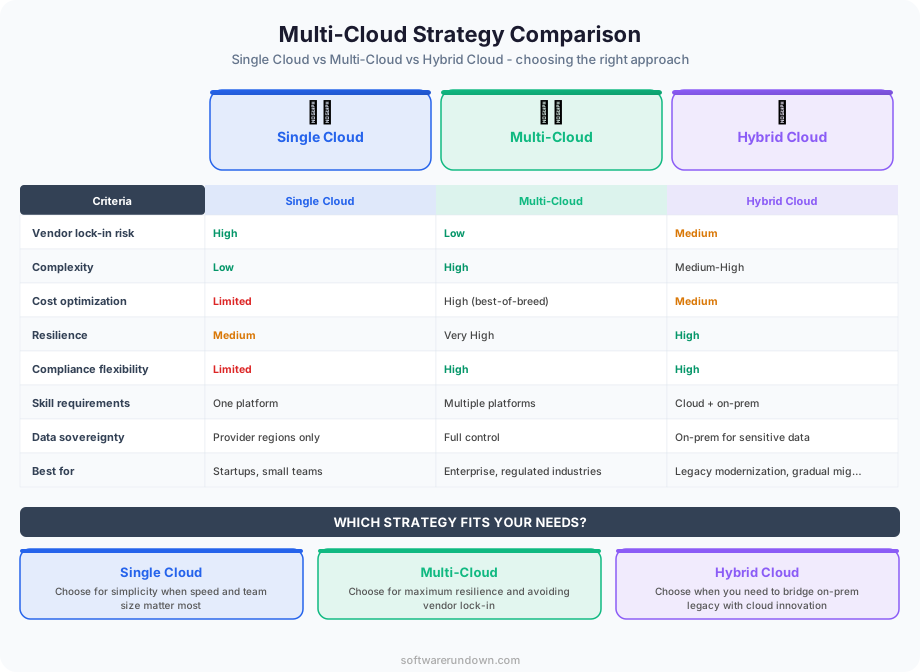
Intentional multi-cloud: A deliberate architectural decision to run related workloads across multiple cloud providers, with cross-cloud networking, shared data, and unified management. This is the complex, expensive version.
Incidental multi-cloud: Different teams or applications independently chose different clouds. Marketing runs on Google Cloud, engineering runs on AWS, and the acquired company brought their Azure infrastructure. There's no unified strategy — it's multi-cloud by accident.
Best-of-breed multi-cloud: Choosing specific services from different providers based on their strengths. BigQuery from Google for analytics, Lambda from AWS for serverless, Azure for .NET workloads. Each workload is self-contained on its provider; there's minimal cross-cloud integration.
Most organizations that claim to be "multi-cloud" are actually in the second or third category. The first — intentional, deeply integrated multi-cloud — is rare and should remain so for most companies.
The Real Benefits
Avoiding Vendor Lock-In
This is the most cited reason for multi-cloud, and it's the one that requires the most nuanced thinking. Yes, depending on a single cloud provider creates dependency. But meaningful vendor lock-in comes from using provider-specific services (Lambda, DynamoDB, BigQuery), not from running VMs on a particular cloud.
If you use only generic compute (VMs, Kubernetes) and standard databases (PostgreSQL, MySQL), switching clouds is labor-intensive but straightforward. If you've built your architecture around provider-specific services (which you should, because they're often superior), the switching cost is enormous regardless of whether you're on one cloud or three.
Multi-cloud doesn't eliminate lock-in — it multiplies it. Now you're locked into the specific services of two or three providers instead of one.
Resilience Against Provider Outages
Major cloud outages (like the AWS us-east-1 incidents or Azure AD outages) are real and can be devastating. Running on multiple clouds provides protection against provider-level failures.
However, consider: major cloud providers have 99.99% uptime for most services. Building and maintaining active-active cross-cloud infrastructure costs significantly more than the downtime it prevents for most businesses. If your business can tolerate a few hours of annual downtime, the resilience argument for multi-cloud may not justify the cost.
For businesses where any downtime is catastrophic (financial services, healthcare, real-time communications), multi-cloud resilience can be justified — but even then, multi-region within a single provider is often more practical and cost-effective.
Best-of-Breed Services
This is the strongest practical argument for multi-cloud. Google Cloud's data analytics (BigQuery, Vertex AI) is arguably best-in-class. AWS has the broadest service catalog and the largest partner ecosystem. Azure integrates seamlessly with Microsoft 365 and Active Directory. Using specific strengths from each provider makes sense when the workloads are largely independent.
Our AWS vs Azure vs Google Cloud comparison details where each provider excels.
Regulatory and Data Sovereignty
Some regulations require data to be stored in specific geographic regions or with specific providers. A European subsidiary might need data on EU-based infrastructure, while the US headquarters runs on a provider with better US coverage. Multi-cloud can address these requirements more flexibly than a single provider.
The Real Risks
Complexity Tax
This is the number one cost of multi-cloud, and it's consistently underestimated. Every cloud provider has its own:
Identity and access management model (IAM policies work differently). Networking model (VPCs, subnets, firewalls use different concepts and terminology). Monitoring and logging tools. CLI and API conventions. Security controls and compliance certifications. Pricing model and billing quirks.
Your team needs expertise in all of them. Your security team needs to audit all of them. Your networking team needs to interconnect them. Your finance team needs to optimize spending across all of them. The overhead is real and ongoing.
Skills Dilution
A team that's expert in AWS can build robust, optimized architectures that leverage the platform's strengths. A team split across three clouds is competent in each but expert in none. The architectures they build will be more generic, more conservative, and less optimized — because they can't deep-dive on any single platform.
Increased Attack Surface
More providers means more identity systems, more API keys, more network boundaries, and more potential misconfigurations. The security surface area grows with each additional cloud, and the most common cloud breaches stem from misconfiguration, not provider vulnerability.
Data Transfer Costs
Cloud providers charge for data leaving their network (egress). If your multi-cloud architecture requires significant data transfer between providers (databases on AWS, analytics on Google Cloud), egress charges can be substantial. AWS charges up to $0.09/GB for data transfer out; moving terabytes between clouds costs thousands per month.
Networking Complexity
Connecting workloads across cloud providers requires either public internet connections (latency, security concerns) or dedicated interconnects (expensive). Services like Megaport, Equinix, or the cloud providers' own interconnect products help, but they add cost and another layer of infrastructure to manage.
Best Practices for Multi-Cloud
If multi-cloud is the right choice for your organization, here's how to do it well:
1. Start with a Clear Rationale
Document why you're going multi-cloud. "Our CTO read an article about it" is not a sufficient reason. Valid reasons include specific regulatory requirements, concrete best-of-breed service needs, or genuine business continuity requirements backed by an RTO/RPO analysis.
2. Minimize Cross-Cloud Dependencies
The most manageable multi-cloud architectures are "loosely coupled" — each workload runs entirely on one cloud, with minimal data flowing between providers. A data analytics workload on Google Cloud and a web application on AWS, connected only through well-defined APIs, is much simpler than an application split across both clouds.
3. Standardize on Kubernetes
If you need workload portability, Kubernetes is the most practical abstraction layer. Containerized workloads can run on EKS (AWS), GKE (Google), AKS (Azure), or on-premises with minimal changes. However, Kubernetes itself adds significant operational complexity, so this isn't a free lunch.
4. Use a Cloud Management Platform
Tools like Terraform (Infrastructure as Code), Pulumi, or Crossplane can manage resources across clouds from a single configuration. HashiCorp's ecosystem (Terraform, Vault, Consul) is designed for multi-cloud management. These tools reduce — but don't eliminate — the complexity of managing multiple providers.
5. Centralize Identity and Access
Use a single identity provider (Okta, Azure AD, Google Workspace) as the source of truth for user identities, federated into each cloud's IAM system. This reduces the number of credential sets to manage and audit.
6. Unify Observability
Choose a cloud-agnostic monitoring platform (Datadog, New Relic, Grafana Cloud) that aggregates metrics, logs, and traces from all providers into a single dashboard. Provider-native monitoring tools (CloudWatch, Cloud Monitoring, Azure Monitor) are excellent for their respective clouds but don't provide cross-cloud visibility.
7. Train Your Team Deliberately
Don't expect everyone to be an expert in every cloud. Assign primary cloud responsibilities to team members and create cross-training programs. Certifications in each platform (AWS Solutions Architect, Google Cloud Professional, Azure Administrator) validate practical knowledge.
8. Control Costs Proactively
Multi-cloud cost optimization is harder than single-cloud because each provider has different pricing models, discount programs (Reserved Instances, Committed Use, Savings Plans), and billing granularity. Use a FinOps platform (CloudHealth, Spot.io, Apptio) to aggregate and optimize spending across providers. Our cloud hosting costs guide covers cost optimization strategies.
Multi-Cloud Decision Framework
Here's a straightforward decision tree:
Your entire organization fits comfortably on one cloud: Stay single-cloud. Invest in deep expertise and leverage provider-specific services. This is the right answer for 80% of organizations.
You have specific, independent workloads that genuinely benefit from different providers: Use best-of-breed multi-cloud with minimal cross-cloud integration. Keep workloads self-contained on their respective clouds.
Regulations require data in specific locations or on specific platforms: Multi-cloud for compliance, with clear boundaries between regulated and non-regulated workloads.
Your business cannot tolerate any single-provider outage: Active-active multi-cloud for resilience, with full acknowledgment of the cost and complexity. Ensure the business case justifies the investment.
Your team wants multi-cloud because it's trendy: Resist. Redirect that energy into deeper expertise on your primary cloud.
The Honest Takeaway
Multi-cloud is a legitimate strategy for organizations with specific, well-understood requirements. It is not a default best practice. The complexity, cost, and skills overhead are significant and persistent.
For most businesses, the better strategy is to go deep on a single cloud provider, use their managed services aggressively, and design your architecture to be portable in principle (containers, standard protocols, infrastructure as code) without actually running on multiple clouds unless you have a concrete reason to do so.
If and when you do need multi-cloud, approach it as a business decision backed by a clear cost-benefit analysis — not as a technical aspiration. The organizations that succeed with multi-cloud are the ones that implemented it deliberately, with adequate investment in tooling, training, and governance. The ones that fail are the ones that drifted into it without a plan.