The Linux vs Windows Server debate has been running for decades, and in 2026, both operating systems are mature, capable, and widely deployed. The right choice isn't about which OS is "better" in the abstract — it's about which one fits your specific workload, team expertise, and technology stack.
Let's cut through the tribal loyalty and look at the practical differences that actually matter for business decisions.
Market Reality
Linux dominates the server market. Over 75% of servers worldwide run Linux, including the vast majority of web servers, cloud instances, and containers. Windows Server holds roughly 20% market share, concentrated in enterprise environments running Microsoft-centric workloads.
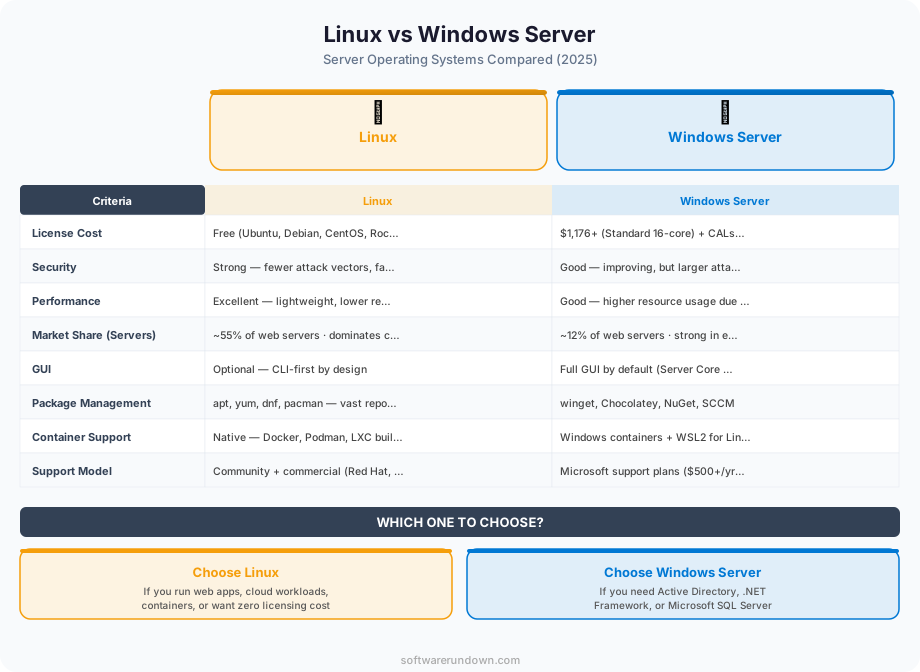
In the cloud, the distribution is even more skewed: over 90% of AWS EC2 instances and the majority of Google Cloud VMs run Linux. Azure is the exception, with a more balanced mix, though even Azure now hosts more Linux than Windows workloads.
This doesn't mean Windows Server is declining — Microsoft's server revenue continues to grow, driven by Active Directory, Exchange, SQL Server, and .NET workloads. It means that the default for new workloads, especially web-facing and cloud-native applications, has firmly shifted to Linux.
Cost
License Costs
Linux: Free. Distributions like Ubuntu Server, Debian, Rocky Linux, and AlmaLinux have no license fees. Enterprise distributions (Red Hat Enterprise Linux, SUSE Linux Enterprise) charge for support subscriptions ($349-$1,299/year per server) but the OS itself is open-source.
Windows Server: Licensed per core, with a minimum of 16 cores per server. Windows Server 2025 Standard is approximately $1,100 for 16 cores; Datacenter edition starts around $7,000. Client Access Licenses (CALs) add $44-$67 per user or device accessing the server.
For cloud instances, the cost difference is baked into the pricing. An AWS EC2 t3.medium running Windows costs roughly 40-80% more per hour than the same instance running Linux. Over a year, that adds up to hundreds or thousands of dollars per server.
Total Cost of Ownership
License costs aren't the full picture. Consider:
Administration costs: If your team is experienced with Windows, administering Linux servers requires training (and vice versa). The cost of hiring or upskilling staff can exceed license savings in the short term.
Tooling: Enterprise Windows management (System Center, Intune, Group Policy) has significant license costs but provides powerful centralized management. Linux management tools (Ansible, Puppet, Chef) are open-source but require more hands-on expertise.
Ecosystem costs: Running SQL Server requires Windows (or Linux, since SQL Server 2017) plus a SQL Server license ($3,945-$15,123 per core). Running .NET Framework applications requires Windows. These dependencies add to the total cost.
Performance
In 2026, both operating systems perform well for their intended workloads. The differences are more about optimization than raw capability:
Linux advantages: Lower memory footprint at idle (a minimal Linux server uses 100-200MB RAM; Windows Server starts at 500MB-1GB). Faster boot times. More efficient handling of high-concurrency workloads (web servers, databases, containers). The Linux kernel is highly tuneable for specific workload characteristics.
Windows advantages: Better integration with Windows-specific workloads (Active Directory, Exchange, SQL Server) that are optimized for the Windows kernel. Consistent performance with Microsoft's first-party applications. Better out-of-the-box performance for .NET applications (though .NET running on Linux has reached near-parity).
For web serving, Linux with Nginx or Apache handily outperforms Windows with IIS in most benchmarks. For SQL Server workloads, performance is comparable on both platforms since SQL Server 2019's Linux optimizations. For containers, Linux is the native and superior choice — Windows containers exist but have larger images, slower startup, and more limited ecosystem support.
Security
This is where the debate gets heated, so let's stick to facts:
Linux security strengths: Smaller attack surface (minimal default installation). Strong permission model (root vs user separation, SELinux/AppArmor mandatory access controls). Rapid community-driven security patches. Transparency — the source code is publicly audited. The majority of security-sensitive infrastructure (firewalls, intrusion detection, DNS servers) runs Linux by default.
Windows security strengths: Robust enterprise security ecosystem (Active Directory, Group Policy, Windows Defender, BitLocker, Credential Guard). Integration with Microsoft's security tools (Defender for Endpoint, Sentinel SIEM). Regular, predictable patch schedule (Patch Tuesday). Comprehensive audit logging and compliance tools.
Reality check: Most server compromises are caused by misconfiguration, unpatched software, and weak credentials — not OS-level vulnerabilities. A well-maintained Windows server is more secure than a neglected Linux server, and vice versa. The OS matters less than the practices around it. Our cybersecurity guide and IT infrastructure security guide cover the practices that matter most.
Administration and Management
Linux Administration
Linux servers are primarily managed through the command line (SSH). Configuration is done via text files. Automation tools like Ansible, Terraform, and shell scripting are the standard workflow.
Strengths: Highly automatable. Infrastructure as Code is natural. Remote management via SSH is lightweight and secure. Package managers (apt, yum/dnf) make software installation and updates straightforward. Configuration files are human-readable and version-controllable.
Challenges: Steeper initial learning curve for administrators coming from Windows backgrounds. No single GUI management tool equivalent to Windows Server Manager. Different distributions have different conventions (systemd vs other init systems, apt vs dnf, different file system layouts). Troubleshooting requires comfort with command-line tools (journalctl, strace, tcpdump).
Windows Server Administration
Windows Server offers both GUI (Server Manager, Windows Admin Center) and CLI (PowerShell) management. Active Directory provides centralized management of users, groups, policies, and devices across the enterprise.
Strengths: Familiar GUI for administrators with Windows backgrounds. Active Directory is an exceptionally powerful and mature directory service. Group Policy allows centralized, granular control over server and client configurations. PowerShell is a capable scripting language for automation. Windows Admin Center provides modern web-based management.
Challenges: Higher resource requirements for management infrastructure. Updates often require reboots (though this has improved). GUI-centric management can be harder to automate and version-control than Linux's file-based configuration. Remote Desktop access is heavier than SSH.
Application Ecosystem
This is often the deciding factor:
Choose Linux for: Web servers (Nginx, Apache). Most programming language runtimes (Python, Node.js, Ruby, Go, Rust, PHP). Containers and Kubernetes. Open-source databases (PostgreSQL, MySQL, MariaDB, Redis, MongoDB). Most cloud-native and DevOps tooling. WordPress and most CMS platforms. See our web hosting guide for how this translates to hosting choices.
Choose Windows for: Active Directory and domain services. Exchange Server. SQL Server (though it also runs on Linux). .NET Framework applications (not .NET Core/.NET 6+, which run on Linux). SharePoint. Legacy Windows-only applications. Hyper-V virtualization.
Both work well for: .NET 6/7/8 applications. SQL Server 2019+. Docker containers (though Linux is preferred). Java applications. Most modern programming frameworks.
Containers and Cloud-Native
If your architecture is container-based, Linux is the clear choice. Docker was built for Linux, Kubernetes was built for Linux, and the entire cloud-native ecosystem assumes Linux as the default.
Windows containers exist and are supported by Docker and Kubernetes, but with significant caveats: Windows container images are 2-5GB (vs 50-200MB for Linux), startup is slower, the selection of pre-built images is far smaller, and many Kubernetes features work differently or not at all with Windows nodes.
Microsoft recognizes this reality — even Azure Kubernetes Service (AKS) recommends Linux nodes as the default, with Windows nodes as an add-on for specific Windows container workloads.
When to Use Each
Use Linux when:
Building web applications or APIs. Running containers or Kubernetes. Hosting websites (WordPress, static sites, PHP applications). Working with open-source databases. Building cloud-native, microservice architectures. Running on a budget (no license costs). Your team has Linux experience or is willing to learn.
Use Windows Server when:
Running Active Directory for enterprise identity management. Hosting Exchange Server for email. Running .NET Framework applications that can't be ported to .NET 6+. Using SQL Server with Windows-specific features. Managing Windows desktop clients via Group Policy. Running legacy applications that require Windows. Your team's expertise is Windows-centric and retraining isn't practical.
Use both when:
Many enterprise environments run both. Active Directory on Windows for identity, web applications on Linux, SQL Server on either. The key is choosing deliberately based on workload requirements rather than defaulting to one OS for everything.
The Trend Line
The trajectory is clear: new workloads are overwhelmingly deployed on Linux, especially in cloud and containerized environments. Windows Server's role is consolidating around Microsoft-ecosystem workloads (AD, Exchange, SharePoint, legacy .NET) where it remains the best or only option.
Microsoft itself has acknowledged this shift — WSL (Windows Subsystem for Linux), SQL Server on Linux, and .NET cross-platform support all reflect Microsoft's acceptance that Linux is the default server OS for most workloads.
For businesses making new infrastructure decisions: start with Linux unless you have a specific Windows requirement. For businesses with existing Windows infrastructure: there's no urgent reason to migrate — Windows Server continues to be well-supported and actively developed. The pragmatic approach is to use each OS where it makes the most sense and avoid religious attachment to either.