Three AI chatbots dominate the market in 2026: ChatGPT, Claude, and Gemini. All three cost $20 a month for their premium tiers. All three can write, code, summarize, and reason. So why does the choice between them still matter? Because the differences — subtle on paper, glaring in daily use — can make or break your workflow.
We spent several weeks running the same prompts through all three: drafting long-form content, debugging Python, summarizing research papers, analyzing spreadsheets, and handling multi-step reasoning tasks. Here is what we found.
| Feature | ChatGPT Plus | Claude Pro | Gemini Advanced |
|---|---|---|---|
| Best Model | GPT-4o | Claude 4 | Gemini 2.0 |
| Monthly Price | $20/mo | $20/mo | $20/mo |
| Context Window | 128K tokens | 200K tokens | 1M tokens |
| Strengths | Ecosystem, plugins, image gen, versatility | Long-form writing, nuanced reasoning, safety | Google integration, multimodal, real-time web |
| Weaknesses | Can be verbose, occasional hallucinations | No image generation, limited third-party integrations | Less consistent reasoning, occasional tone issues |
| Best For | Power users, developers, content creators | Writers, analysts, researchers, enterprises | Google Workspace users, researchers needing large context |
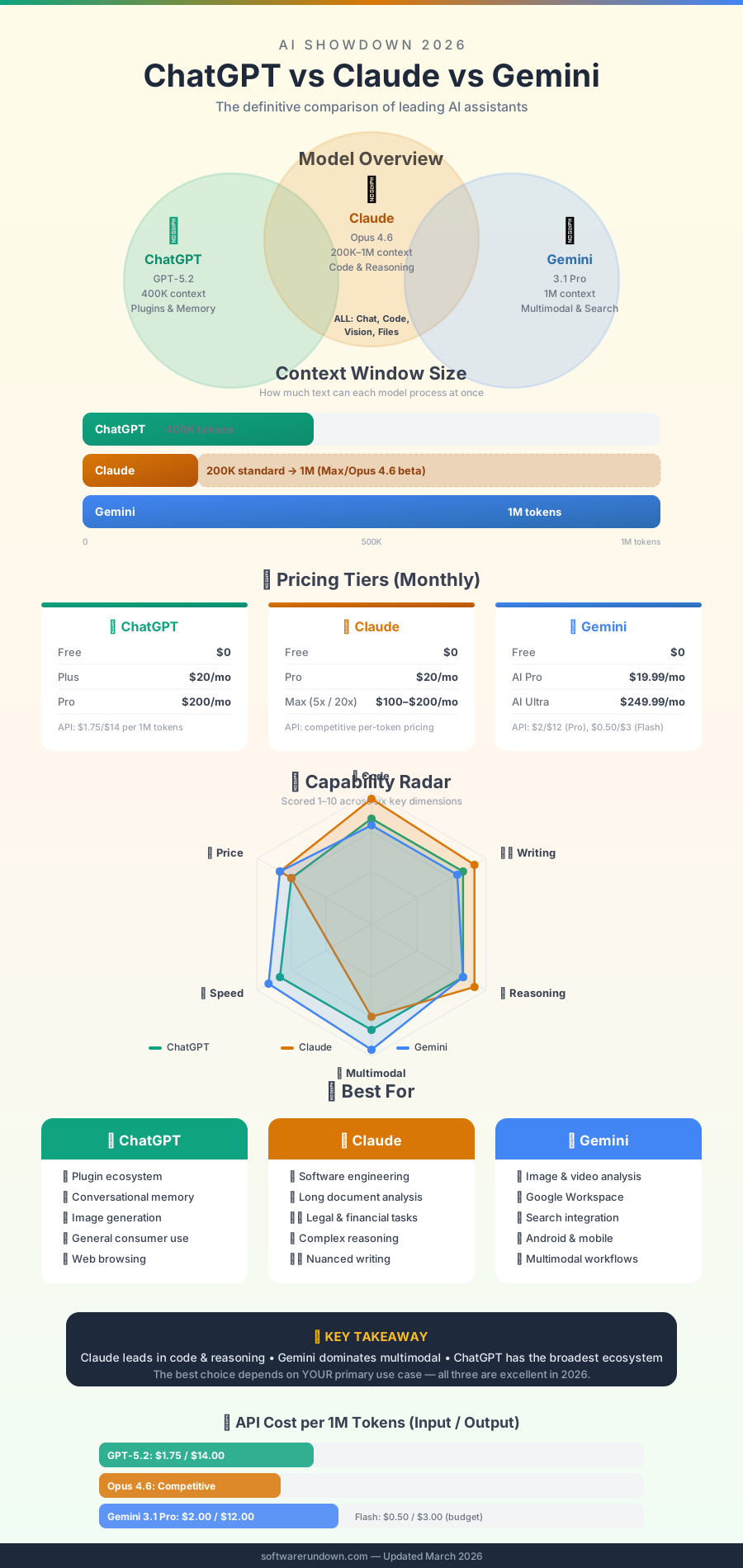
If you are building a serious AI workflow, we also recommend reading our roundup of the best AI tools in 2026 for a broader view of the ecosystem beyond chatbots alone.
ChatGPT Plus: The Swiss Army Knife
OpenAI's ChatGPT remains the most recognized name in AI, and GPT-4o — the model powering ChatGPT Plus — is genuinely excellent across a wide range of tasks. But what really gives ChatGPT its edge in 2026 is not the model alone. It is the ecosystem.
What GPT-4o Gets Right
GPT-4o handles multi-step instructions well. Ask it to write a marketing brief, extract the key action items, then reformat them as a project checklist — it completes the chain without losing thread. Code generation is strong: it produces working Python, JavaScript, and SQL on the first try more often than not, and its error messages are actually useful when something breaks.
The integration with DALL-E for image generation is a genuine productivity win. Marketers and content creators who need both text and visuals in a single session will find this combination hard to replicate elsewhere without switching tools.
Memory is another underrated feature. ChatGPT can remember your preferences across sessions — your preferred writing tone, your job, your recurring projects — which reduces the repetitive setup that plagues prompt-heavy workflows.
Where ChatGPT Falls Short
The 128K context window is competitive but not class-leading. If you routinely work with book-length documents, legal contracts, or entire codebases in a single session, you will hit the ceiling. GPT-4o can also be verbose when you want brevity — it has a tendency to over-explain, which is charming in tutorials but frustrating when you need a quick answer.
Occasional hallucinations remain a concern, particularly on obscure factual questions or when the model confidently cites sources that do not exist. Always verify. See our breakdown of ChatGPT Plus pricing and what you get for $20 a month for a full cost analysis.
Who Should Use ChatGPT
ChatGPT is the right choice for power users who want one tool that does everything adequately or better. Developers, marketers, content creators, and anyone who wants access to a large plugin ecosystem will get the most value here. The breadth of integrations — from Zapier to coding environments to custom GPTs — makes it the most flexible option of the three.
Claude Pro: The Writer's AI
Anthropic's Claude has always felt different from the other two, and in 2026 that feeling has a name: intentionality. Claude Pro runs on Claude 4, and the leap in reasoning quality and writing fluency compared to earlier versions is substantial.
What Claude 4 Gets Right
Long-form writing is where Claude consistently outperforms the competition. Ask it to write a 3,000-word analytical essay, a product spec document, or a nuanced op-ed, and the output reads like it came from someone who has actually thought about the topic — not just someone pattern-matching on training data. The prose is cleaner, the structure is more logical, and it does not pad word counts with filler.
The 200K token context window means you can paste in an entire research paper, a lengthy contract, or a complex codebase and ask questions across the full document without the model losing track of early sections. This is not a marginal improvement over 128K in practice — it is a qualitatively different experience when working with large documents.
Claude's approach to nuanced ethical and factual questions is also notable. It tends to be more careful about acknowledging uncertainty, more willing to say "I'm not sure" rather than confabulate, and better at presenting multiple perspectives on contested issues without defaulting to false balance.
Where Claude Falls Short
Claude Pro does not generate images. That alone eliminates it for many creative workflows. Third-party integrations are also more limited than ChatGPT's plugin ecosystem — there is no equivalent to Custom GPTs or the depth of Zapier connectors. If you need your AI embedded in a complex software workflow, Claude's options are narrower.
Some users find Claude's safety guardrails more restrictive than they would like, particularly in creative writing with dark or mature themes. Whether this is a bug or a feature depends heavily on your use case.
Who Should Use Claude
Claude Pro is the best choice for writers, editors, researchers, legal professionals, and anyone whose primary use case involves processing or producing substantial amounts of text. It is also increasingly popular in enterprise contexts where the quality of reasoning and the accuracy of summaries matter more than breadth of features. If you write for a living or analyze documents professionally, Claude is worth trying before defaulting to the more famous alternatives.
Gemini Advanced: The Google Native
Google's Gemini Advanced, running on Gemini 2.0, is the most underrated of the three — and also the most situational. Its headline feature, a 1 million token context window, is genuinely extraordinary and has no real competitor at this price point. But the rest of the experience is more uneven.
What Gemini 2.0 Gets Right
The context window is the story. One million tokens means you can feed Gemini an entire book, a year's worth of emails, or a large codebase and conduct a genuine conversation about the full content. For researchers, lawyers, and data analysts working with massive document sets, this capability alone can justify the subscription.
Gemini's integration with Google Workspace is seamless in a way the other two cannot match. It drafts emails in Gmail, summarizes threads, generates slides in Google Slides, and works natively inside Google Docs. If your work lives in Google's ecosystem, Gemini feels less like a separate tool and more like a native upgrade to apps you already use every day.
Real-time web access is also well-implemented. Gemini pulls in current information more reliably than GPT-4o's browsing mode, which can be inconsistent. For market research, news monitoring, or any task requiring up-to-date data, Gemini's web integration is the most dependable of the three.
Where Gemini Falls Short
Reasoning consistency is Gemini's Achilles heel. On complex multi-step problems — the kind that require holding several variables in mind while working toward a logical conclusion — Gemini 2.0 produces more errors than Claude 4 or GPT-4o. It is not unreliable in absolute terms, but compared to its competitors, the gap is noticeable on hard tasks.
Tone can also be an issue. Gemini's writing sometimes has an impersonal, corporate quality that requires more editing to sound natural. For content that needs to feel human — blog posts, emails, creative copy — you will often spend more time cleaning up Gemini's output than you would with Claude or ChatGPT.
Who Should Use Gemini
Gemini Advanced is the right call if you are already embedded in Google Workspace and want AI that works with those tools rather than alongside them. Researchers and analysts who routinely work with very large documents — and who have not found the 128K or 200K windows sufficient — will find the 1M context window genuinely transformative. For everyone else, Gemini is a solid third option but not the first recommendation.
Head-to-Head: How They Perform on Real Tasks
Writing and Editing
Claude wins this category clearly. Its long-form output is the most polished, its editing suggestions are the most precise, and it handles stylistic constraints (formal, casual, technical, narrative) with the most fidelity. ChatGPT is a close second. Gemini trails on quality but is adequate for internal documents and drafts.
Coding and Development
ChatGPT edges out Claude here, largely due to its broader ecosystem of coding integrations and the depth of its debugging explanations. Claude is excellent for code review and documentation. Gemini is functional but less consistent on complex algorithmic problems. For developer-specific tools, see our GitHub Copilot vs Cursor vs Amp comparison for the AI coding assistants in depth.
Research and Summarization
Gemini's combination of large context and live web access makes it the strongest research companion — provided the task does not require deep reasoning. Claude is the better choice when you need synthesis and analysis rather than just retrieval. ChatGPT sits in the middle.
Data Analysis and Spreadsheets
ChatGPT's Code Interpreter (now integrated into the standard Plus tier) remains the most capable tool for working with uploaded data files. Gemini's Workspace integration helps with Google Sheets specifically. Claude handles data questions well in text but lacks a native execution environment.
Which One Should You Pick?
At $20 a month each, none of these is a bad deal. But the right choice depends on your primary use case:
- ChatGPT Plus if you want the most versatile tool with the broadest integrations and image generation.
- Claude Pro if writing quality, document analysis, and reasoning accuracy are your top priorities.
- Gemini Advanced if you live in Google Workspace or regularly work with very large document sets that exceed other models' context limits.
Some users — particularly professionals with heavy AI workloads — subscribe to more than one. Claude for writing and analysis, ChatGPT for coding and creative tasks, Gemini for Google-native workflows. That totals $60 a month, which is still less than most professional software subscriptions in 2026.
The gap between these three has narrowed significantly over the past year. Choosing wrong is no longer catastrophic. But choosing right, for your specific workflow, still saves real time every day. Start with Claude if you write. Start with ChatGPT if you build. Start with Gemini if you research at scale inside Google's ecosystem.
For a broader view of where AI tools are heading this year, check out our complete guide to the best AI tools in 2026. Ready to put your chosen AI to work? Our AI business integration guide covers the practical rollout framework.