As applications grow from a single monolith to a collection of microservices, a problem emerges: how do clients (web apps, mobile apps, third-party integrations) communicate with dozens or hundreds of backend services without the architecture turning into a tangled mess? The answer, in most modern architectures, is an API gateway.
What Is an API Gateway?
An API gateway is a server that acts as the single entry point for all client requests to your backend services. Instead of clients calling individual microservices directly, they send all requests to the gateway, which routes each request to the appropriate service, aggregates responses when needed, and handles cross-cutting concerns like authentication, rate limiting, and logging.
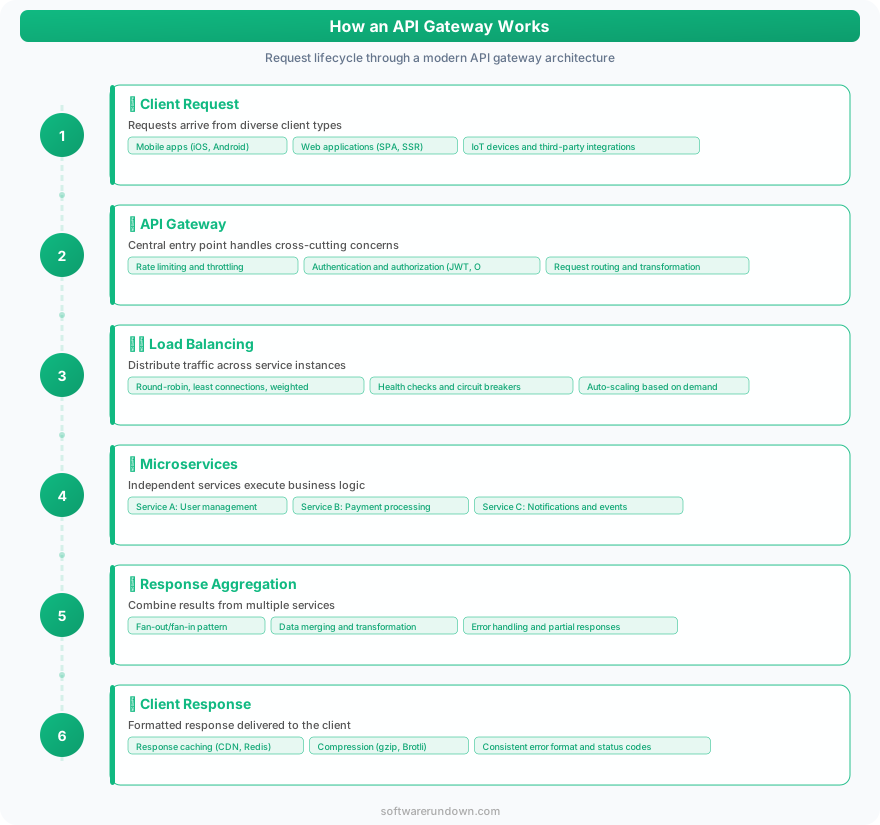
Think of it as a hotel concierge. Guests (clients) don't need to know which department handles their request — they tell the concierge, and the concierge routes it to housekeeping, the restaurant, the spa, or maintenance as needed. The guest interacts with one point of contact; the hotel's internal organization is hidden.
What Does an API Gateway Do?
Request Routing
The most fundamental function. The gateway maps incoming requests to backend services based on the URL path, HTTP method, headers, or other criteria. A request to /api/users routes to the user service; /api/orders routes to the order service; /api/products routes to the product catalog.
This decouples clients from backend service locations. Services can be moved, scaled, or replaced without changing client code — the gateway configuration handles the mapping.
Authentication and Authorization
Rather than every microservice implementing its own authentication logic, the gateway verifies tokens (JWT, OAuth2, API keys) at the edge. Only authenticated, authorized requests proceed to backend services. This centralizes security logic and reduces the risk of inconsistent authentication across services.
The gateway can validate JWTs, check token expiration, verify scopes and permissions, and reject unauthorized requests before they consume backend resources.
Rate Limiting and Throttling
Protect your services from abuse, traffic spikes, and denial-of-service attacks by limiting the number of requests per client, per IP, or per API key within a time window. Different clients can have different rate limits — a free tier might allow 100 requests per minute while a premium tier allows 10,000.
Rate limiting at the gateway level protects all backend services simultaneously, which is more efficient and consistent than implementing limits in each service individually.
Request and Response Transformation
The gateway can modify requests before forwarding them (adding headers, transforming payloads, converting between formats) and modify responses before returning them to clients (filtering fields, merging responses from multiple services, converting XML to JSON).
This is particularly useful for supporting multiple client types. A mobile app might need a compact response with fewer fields, while a web dashboard needs the full payload. The gateway can tailor responses per client type without changing backend services.
Load Balancing
When multiple instances of a service are running, the gateway distributes requests across them — round-robin, least-connections, or weighted algorithms. While dedicated load balancers (NGINX, HAProxy, cloud load balancers) handle this at the infrastructure level, many API gateways include basic load balancing for convenience.
Caching
Frequently requested, rarely changing data can be cached at the gateway level, reducing load on backend services and improving response times. Product catalog data, configuration settings, and static reference data are common caching candidates.
Monitoring and Analytics
The gateway is the natural place to collect API metrics — request counts, latency, error rates, payload sizes. These metrics feed dashboards and alerts that keep your team informed about API health and usage patterns.
API Versioning
Support multiple API versions simultaneously by routing version-specific requests (/api/v1/users vs /api/v2/users) to different backend service versions. This allows gradual migration without breaking existing clients.
When Do You Need an API Gateway?
You definitely need one if: You run microservices and need a unified entry point. You expose APIs to external consumers (third-party developers, partners). You need centralized authentication, rate limiting, or analytics across multiple services.
You probably don't need one if: You have a single monolithic application. You have a small number of services (2-3) with limited cross-cutting concerns. You're early-stage and the operational overhead isn't justified.
The transition point typically comes when you have 5+ services and find yourself duplicating authentication, logging, or rate limiting logic across them. That's when the gateway pays for itself in reduced complexity.
Popular API Gateway Options
Cloud-Native Gateways
AWS API Gateway: The default choice for AWS-based architectures. Fully managed, integrates natively with Lambda (serverless), Cognito (authentication), and CloudWatch (monitoring). Supports REST, HTTP, and WebSocket APIs. Pricing is per-request ($1-3.50 per million requests depending on type).
Google Cloud API Gateway / Apigee: Cloud API Gateway is the lightweight option for Google Cloud services. Apigee is the enterprise-grade platform (acquired by Google) with advanced analytics, developer portal, and monetization features.
Azure API Management: Microsoft's offering with a full-featured developer portal, policy engine, and analytics. Well-integrated with Azure services and particularly strong for .NET-based architectures.
Self-Hosted / Open Source
Kong: The most popular open-source API gateway. Built on NGINX/OpenResty, Kong is highly performant and extensible through plugins. The open-source version covers routing, authentication, rate limiting, and logging. Kong Enterprise adds a management UI, developer portal, and advanced analytics. Kong is an excellent choice for teams that want control over their infrastructure without building from scratch.
NGINX: While primarily a web server and reverse proxy, NGINX can function as a lightweight API gateway with its routing, load balancing, and rate limiting capabilities. NGINX Plus adds more gateway-specific features. For simple architectures, NGINX may be all you need without a dedicated gateway product.
Traefik: A cloud-native edge router that's particularly popular in Docker and Kubernetes environments. Traefik automatically discovers services and configures routing, making it ideal for dynamic container environments.
Tyk: An open-source gateway with a Go-based architecture that's lighter weight than Kong. Includes a dashboard, analytics, and developer portal in the open-source version (with some features limited to the commercial offering).
Specialized / Modern
Cloudflare API Gateway: Runs on Cloudflare's edge network, providing gateway functionality at the CDN layer. Schema validation, mTLS, and anomaly detection are built in. Ideal for APIs that benefit from global edge distribution.
Gravitee: A full API management platform with gateway, designer, developer portal, and analytics. The open-source core is feature-rich; the enterprise version adds advanced security and compliance features.
API Gateway Architecture Patterns
Single Gateway
One gateway handles all client requests to all services. Simple to manage but can become a bottleneck and single point of failure at scale. Suitable for small to medium architectures.
Backend-for-Frontend (BFF)
Separate gateways for different client types — one for the web app, one for the mobile app, one for third-party integrations. Each gateway tailors its API to its client's needs, handling client-specific transformations and aggregations. More complex to manage but provides better client experiences.
Gateway per Domain
Different business domains (user management, orders, payments) each have their own gateway. This aligns with team ownership — the payments team manages the payments gateway, including its routing, rate limiting, and authentication rules. Common in large organizations with domain-driven design.
Common Anti-Patterns
Business logic in the gateway: The gateway should route, authenticate, and transform — not contain business logic. When your gateway starts making business decisions (applying discounts, validating business rules), it becomes a monolithic bottleneck that defeats the purpose of microservices.
Gateway as the single point of failure: A gateway that goes down takes every service down with it. High availability (multiple instances, health checks, automatic failover) is non-negotiable. Most managed gateways handle this; self-hosted deployments need explicit HA configuration.
Over-transformation: Extensive request/response transformation in the gateway creates a maintenance burden and performance overhead. If you find yourself writing complex transformation logic, consider whether the backend service should handle it instead.
Ignoring latency: The gateway adds a network hop. For most APIs, this overhead is negligible (single-digit milliseconds). But for latency-critical paths, measure the impact and optimize (connection pooling, caching, reducing transformation complexity).
Getting Started
If you're new to API gateways, here's a practical starting path:
Cloud-first: If you're on AWS, start with AWS API Gateway in front of your services. It's managed, requires no infrastructure, and you can start with a single endpoint. Google Cloud and Azure have equivalent options.
Self-hosted: If you want self-hosted, start with Kong in DB-less mode (declarative configuration via YAML). It's lightweight, performant, and the plugin ecosystem covers most needs. Graduate to the database-backed mode and Kong Enterprise if you need a management UI and advanced features.
Kubernetes-native: If you're running on Kubernetes, Traefik or the Kubernetes Ingress Controller (NGINX-based) provides gateway-like functionality with native service discovery.
Start simple — routing and basic authentication. Add rate limiting, caching, and analytics as your API grows. An over-engineered gateway on day one creates unnecessary complexity. A well-configured gateway that grows with your architecture becomes an indispensable piece of infrastructure. For the broader DevOps context, see our practical guide.